





In today’s competitive job market, it’s more important than ever to have a resume that stands out from the crowd. And with the increasing use of Applicant Tracking Systems (ATSs), it’s essential to make sure your resume is ATS-friendly. In this blog post, we’ll reveal the secrets to crafting ATS-friendly resumes that will showcase your skills and land you dream jobs in 2026.
Understanding ATS and Its Role in Resume Screening
What is an ATS?
An ATS is a software program that helps employers manage the recruitment process. ATSs can screen resumes, sort candidates, and even schedule interviews.
How do ATSs work?
ATSs use keywords to scan resumes. If your resume doesn’t contain the right keywords, it may be overlooked by the ATS.
Why is it important to optimize your resume for ATS?
Optimizing your resume for ATS can help you get your resume seen by more employers and increase your chances of landing an interview.
Optimizing Your Resume for ATS Recognition
Use keywords. The most important thing you can do to optimize your resume for ATS is to use keywords. Keywords are the words and phrases that employers are looking for when they screen resumes. You can find keywords by researching job descriptions and industry-specific websites.
Use a clear and concise format. ATSs prefer resumes that are easy to read and scan. Use a simple font, such as Arial or Times New Roman, and avoid using excessive formatting.
Use headings and subheadings. Headings and subheadings help ATSs identify the different sections of your resume. Use headings to highlight your skills, experience, and education.
5 ATS-Friendly Resume Templates to Impress Employers
1. The Classic template
The Classic template is a simple and straightforward resume template that is easy to read and ATS-friendly. It features a clean design with a focus on your skills and experience.
2. The Modern template
The Modern template is a more contemporary resume template that is designed to make a statement. It features a sleek design with bold fonts and graphics.
3. The Creative template
The Creative template is a unique resume template that is perfect for creative professionals. It features a visually appealing design with a focus on your portfolio and work samples.
4. The Functional template
The Functional template is a skills-based resume template that is ideal for highlighting your transferable skills. It features a skills-first format that emphasizes your abilities and experience.
5. The Chronological template
The Chronological template is a traditional resume template that lists your work experience in reverse chronological order. It features a simple and straightforward design that is easy to read and ATS-friendly.
Tailoring Your Resume to Specific Job Descriptions
In addition to using keywords and optimizing your resume for ATS, it’s also important to tailor your resume to each job description that you apply for. This means highlighting the skills and experience that are most relevant to the job.
For example, if you’re applying for a job as a marketing manager, you would want to highlight your skills in marketing strategy, campaign management, and social media marketing. You would also want to include any experience that you have in the marketing field.
Incorporating Keywords and Phrases for Maximum Visibility
One of the best ways to optimize your resume for ATS is to incorporate keywords and phrases throughout your resume. You can do this by using keywords in your resume summary, skills section, and experience section.
For example, if you’re applying for a job as a software engineer, you would want to use keywords such as “software development,” “programming,” and “computer science.” You would also want to include phrases such as “developed software applications” and “managed software development teams.”
By following the tips in this blog post, you can create an ATS-friendly resume that will get you noticed by employers and land you dream jobs in 2026. ResumeGemini offers a variety of ATS-friendly resume templates and resources that can help you create a resume that stands out from the crowd.
Career Expert Tips:
- Select the ideal resume template to showcase your professional experience effectively.
- Master the art of resume writing to highlight your unique qualifications and achievements.
- Checkout the resume writing tips for guidance and best practices.
- Make your 2025 brighter with a new job. Build a powerful resume with ResumeGemini and save big, enjoy exclusive discounts on premium templates.
Frequently Asked Questions (FAQ’s)
How do I ensure my resume passes ATS screening?
To ensure your resume passes Applicant Tracking System (ATS) screening, follow these key strategies:
- Use keywords from the job description: ATSs rely on keyword matching to identify relevant candidates. Incorporate industry-specific keywords and phrases throughout your resume, especially in your skills section and work experience descriptions.
- Maintain a consistent format: ATSs prefer resumes with a structured format. Avoid using fancy fonts, graphics, or images that can confuse the system. Stick to a clean and readable layout, using standard fonts and headings.
- Optimize your file type: Most ATSs support PDF and DOCX file formats. Avoid using other file types like JPEG or PNG, as they may not be compatible with the system.
- Use header tags: Header tags (H1, H2, H3) help ATSs identify the different sections of your resume. Use them to structure your headings, such as “Skills,” “Education,” and “Work Experience.”
- Avoid using tables and charts: ATSs may struggle to parse information presented in tables or charts. Instead, use plain text to convey your skills and experience.
What are the key elements of an ATS-friendly resume?
An ATS-friendly resume should include the following key elements:
- Contact information: Your name, email address, phone number, and LinkedIn profile URL should be prominently displayed at the top of your resume.
- Professional summary: A brief statement (2-3 sentences) that highlights your key skills, experience, and career goals.
- Skills section: A list of your hard and soft skills, organized by category or relevance to the job you’re applying for.
- Work experience: A chronological list of your previous jobs, starting with the most recent. Include job titles, company names, dates of employment, and a brief description of your responsibilities.
- Education: A list of your educational qualifications, including the name of the institution, degree obtained, and dates of attendance.
- Certifications and awards: A list of any relevant certifications or awards you have received.
- Additional sections: Depending on your industry and experience, you may also include sections for languages, publications, volunteer work, or extracurricular activities.
How can I customize my resume for different job applications?
To customize your resume for different job applications, follow these steps:
- Read the job description carefully: Identify the key skills and qualifications required for the position. Tailor your resume to highlight your relevant experience and abilities.
- Use a keyword-rich resume: Incorporate keywords from the job description throughout your resume, especially in your skills section and work experience descriptions.
- Tailor your professional summary: Highlight the skills and experience that are most relevant to the specific job you’re applying for.
- Quantify your accomplishments: Use numbers and metrics to demonstrate your impact in previous roles. For example, instead of saying “Managed a team of 10,” you could say “Managed a team of 10 engineers, leading to a 15% increase in productivity.”
- Proofread carefully: Before submitting your resume, proofread it carefully for any errors in grammar, spelling, or formatting.
What are the common mistakes to avoid when creating an ATS-friendly resume?
Some common mistakes to avoid when creating an ATS-friendly resume include:
- Using vague or generic language: Instead of using general statements like “Responsible for managing projects,” use specific examples and accomplishments.
- Overusing buzzwords: While it’s important to use industry-specific keywords, avoid overusing buzzwords that are common on many resumes.
- Including irrelevant information: Only include information that is relevant to the job you’re applying for. Avoid listing outdated or unrelated experience.
- Making your resume too long: ATSs prefer resumes that are concise and easy to scan. Keep your resume to one page, or two pages if you have extensive experience.
- Using a creative or unconventional format: While it’s important to make your resume visually appealing, avoid using unconventional formats or designs that may confuse the ATS.
How can I improve my resume’s visual appeal while maintaining ATS compatibility?
You can improve your resume’s visual appeal while maintaining ATS compatibility by following these tips:
- Use a professional resume template: A well-designed template can make your resume look professional and organized. Choose a template that is simple and easy to read.
- Use headings and subheadings: Headings and subheadings help break up your resume and make it easier to scan. Use them to organize your information into logical sections.
- Use bullet points: Bullet points make your resume easier to read and skim. Use them to list your skills, experience, and accomplishments.
- Use a consistent font: Using a consistent font throughout your resume creates a unified look. Choose a font that is easy to read and professional.
- Use white space: White space can help make your resume look less cluttered and more readable. Use white space to separate sections of your resume and to create a margin around the edges of the page.
Next Step:
Now that you know the secrets to creating an ATS-friendly resume, it’s time to take the next step. Head over to ResumeGemini, the leading resume builder website, and use our premium, ATS-friendly templates to create a resume that will land you your dream job. With over 3.6 million content examples and a step-by-step process, ResumeGemini makes it easy to create a resume that will pass ATS screening and impress hiring managers.
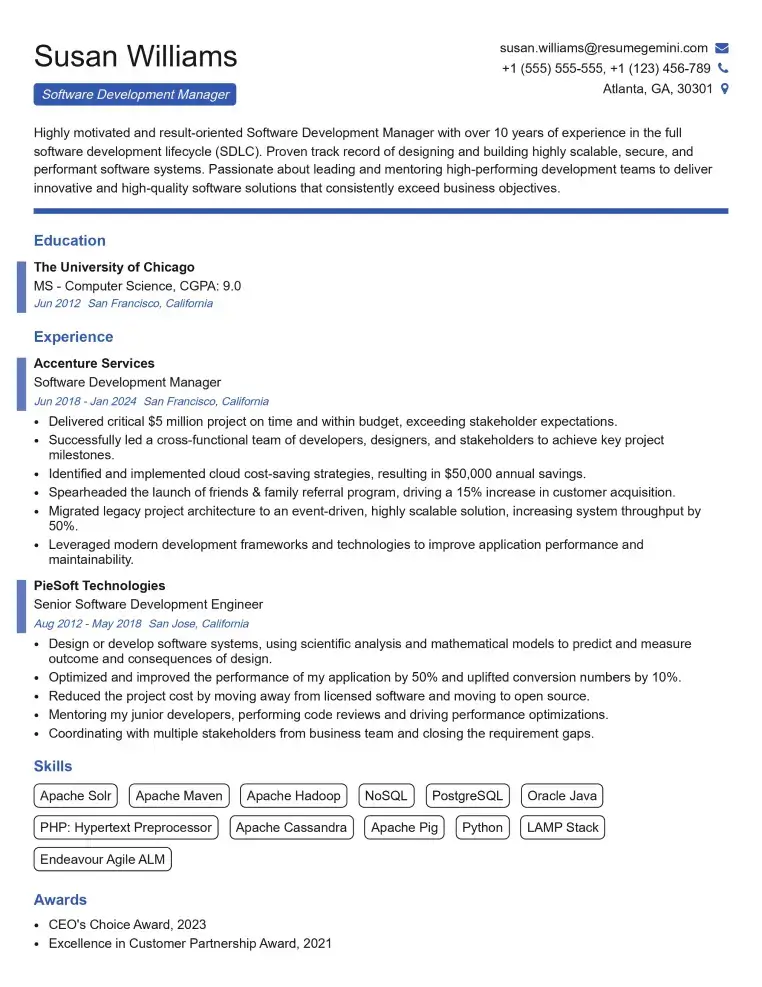
Elevate your job search with our premium resume templates. Here is an amazing resume template that can be used to build a professional and elegant resume. You can build a resume from scratch or revamp your existing resume. Impress hiring managers and secure your next opportunity.
- Top 50 Most Common Interview Questions
- The Psychology of a Great Resume: Hacks to Impress Recruiters
- What Mistakes to Avoid When Writing a Resume: A Comprehensive Guide
- Elevate Your Career with Expert Resume Building: Introducing ResumeGemini
- How to Write a Resume Using Google Gemini: Step-by-Step Guide