





In today’s competitive job market, having a professional resume is essential for landing your dream job. A well-written resume can highlight your skills, experience, and accomplishments, making you stand out from the crowd.
Why You Need Professional Resume Templates
Professional resume templates provide several benefits, including:
- Consistency and Formatting: Templates ensure that your resume is formatted consistently, making it easy for recruiters and hiring managers to quickly scan and find the information they need.
- Professional Appearance: Templates are designed to look professional and polished, giving your resume a polished and reputable look.
- Time-Saving: Using a template saves you the time and hassle of designing your resume from scratch.
Our Library of 60+ Resume Templates
ResumeGemini’s extensive library of 60+ resume templates offers a wide range of options to suit every career path. From classic and traditional designs to modern and eye-catching styles, you’re sure to find the perfect template to highlight your unique skills and experience.
How to Choose the Right Resume Template for You
Consider the following factors when choosing a resume template:
- Career Field: Different industries and professions tend to prefer different resume styles. For example, a creative professional might choose a more visually appealing template, while a finance professional might opt for a more conservative and traditional design.
- Experience Level: Your experience level can also influence your template choice. If you have extensive experience, a chronological resume template might be more suitable to showcase your career progression. If you’re a recent graduate or have limited experience, a functional or combination resume template can highlight your skills and transferable experience.
- Personal Style: Ultimately, your resume template should reflect your personal style and career aspirations.
Customizing Your Resume Template
Once you’ve chosen a template, you can customize it to make it truly your own. Here’s how:
- Change the Font and Colors: Choose fonts and colors that are professional and visually appealing. Avoid using too many different fonts or colors, as this can make your resume look cluttered and unprofessional.
- Add Your Logo or Photo: If appropriate, include your logo or a professional headshot to give your resume a unique and personal touch.
- Highlight Your Skills and Experience: Tailor your resume content to each specific job application, highlighting the skills and experience that are most relevant to the position you’re seeking.
Adding Your Content to the Resume Template
Your resume should include the following key sections:
- Contact Information: Make sure your contact information is prominently displayed and easy to find.
- Summary or Objective: Write a brief statement that summarizes your skills, experience, and career goals.
- Work Experience: List your relevant work experience in reverse chronological order, including your job title, company name, and the dates you worked there.
- Education: List your educational background, including your degree, school name, and graduation date.
- Skills: Highlight your skills and abilities, including both hard and soft skills.
- Additional Sections: Consider including additional sections, such as Awards, Certifications, Languages, Accomplishments, Extra Curricular, and References, if they are relevant to your career path.
Finalizing Your Resume
Once you’ve added your content, carefully proofread your resume for any errors in grammar, spelling, or formatting. Ask a friend, family member, or career counselor to review your resume and provide feedback.
When you’re satisfied with your resume, save it as a PDF to ensure that it maintains its formatting when you send it to potential employers.
Common Mistakes to Avoid When Creating a Resume
Avoid these common mistakes when creating your resume:
- Lying or Exaggerating: Be truthful and accurate in your resume. Any false information can damage your credibility.
- Including Irrelevant Information: Keep your resume focused on the most relevant information for the job you’re applying for.
- Using Poor Formatting: Use a consistent and professional font and layout. Avoid using too many colors or graphics.
- Being Too Long: Keep your resume concise and easy to read. Aim for one page for most entry-level positions and up to two pages for more experienced professionals.
- Not Proofreading: Carefully proofread your resume for any errors before submitting it to potential employers.
Career Expert Tips:
- Select the ideal resume template to showcase your professional experience effectively.
- Master the art of resume writing to highlight your unique qualifications and achievements.
- Checkout the resume writing tips for guidance and best practices.
- Make your 2025 brighter with a new job. Build a powerful resume with ResumeGemini and save big, enjoy exclusive discounts on premium templates.
Frequently Asked Questions (FAQ’s)
What are the benefits of using a professional resume template?
Professional resume templates offer several advantages that can help you stand out in the job market:
- ATS-Friendliness: ATS (Applicant Tracking Systems) are software programs used by many companies to screen job applications. Templates are designed to be ATS-friendly, ensuring your resume is parsed correctly and reaches hiring managers.
- Professional Design: Templates are crafted by professional designers to present your skills and experience in a visually appealing and organized manner.
- Time-Saving: Templates provide a framework, eliminating the need to start from scratch and saving you valuable time.
- Consistency: Templates ensure consistency in formatting and style throughout your resume, creating a polished and cohesive document.
How do I choose the right resume template for me?
Selecting the right template depends on your industry, career level, and personal style:
- Consider Industry Standards: Research industry norms and choose a template that aligns with expectations for your field.
- Match Your Career Level: Entry-level and experienced professionals may prefer different template styles. Choose one that complements your experience and career goals.
- Personalize to Your Style: While templates provide a framework, you can customize them to reflect your personal brand. Consider your preferred fonts, colors, and overall aesthetic.
- Review Examples: Refer to sample resumes or browse template galleries to see how different styles look with real content.
Can I customize the resume templates?
Yes, most resume templates are highly customizable:
- Edit Content: Replace placeholder text with your personal information, skills, and experience.
- Adjust Formatting: Change font size, margins, and section headings to suit your needs.
- Add or Remove Sections: Depending on the template, you can add or remove sections as needed, such as awards, certifications, or references.
- Change Colors and Fonts: Templates often allow you to customize the color scheme and font style to match your personal or company branding.
How do I add my content to the resume template?
Adding your content is straightforward:
- Download or Import Template: Choose a template and download it or import it into a compatible software or online platform.
- Replace Placeholder Text: Select the placeholder text and replace it with your own information.
- Customize Formatting: Adjust formatting as desired, including font size, margins, and section headings.
- Proofread Carefully: Once you have added your content, proofread it thoroughly for any errors in grammar, spelling, or formatting.
What are some common mistakes to avoid when creating a resume?
To create an effective resume, avoid the following common mistakes:
- Typos and Grammatical Errors: Proofread your resume carefully to eliminate any errors that could detract from your professionalism.
- Inconsistent Formatting: Maintain consistency in font size, margins, and section headings throughout your resume.
- Unnecessary Information: Include only relevant information that showcases your skills and experience for the specific job you are applying for.
- Lack of Quantifiable Results: Whenever possible, use numbers and metrics to quantify your accomplishments and demonstrate your impact.
- Excessive Length: Keep your resume concise and to the point, typically around one page for entry-level applicants and two pages for experienced professionals.
Why choose ResumeGemini for my resume needs?
ResumeGemini offers a comprehensive suite of tools and templates to help you create a professional and impactful resume:
- Wide Selection of Templates: Choose from over 60 customizable templates tailored to various industries and career paths.
- ATS-Optimized Resumes: Our templates are designed to be ATS-friendly, increasing your chances of getting noticed by potential employers.
- Easy Customization: With our intuitive interface, you can easily personalize your resume to highlight your unique skills and experience.
- Sample Resumes: Browse our extensive library of 45,000+ pre-built sample resumes for inspiration and guidance.
- One-Time Payment: Enjoy lifetime access to our services with a single payment, without any recurring charges.
Next Step:
Take charge of your career journey and create a stunning resume that will make you stand out. Visit ResumeGemini today to browse our collection of 60+ professional resume templates and start building your dream resume. With our easy-to-use platform and expert guidance, you can craft a resume that will captivate hiring managers and land you your dream job.
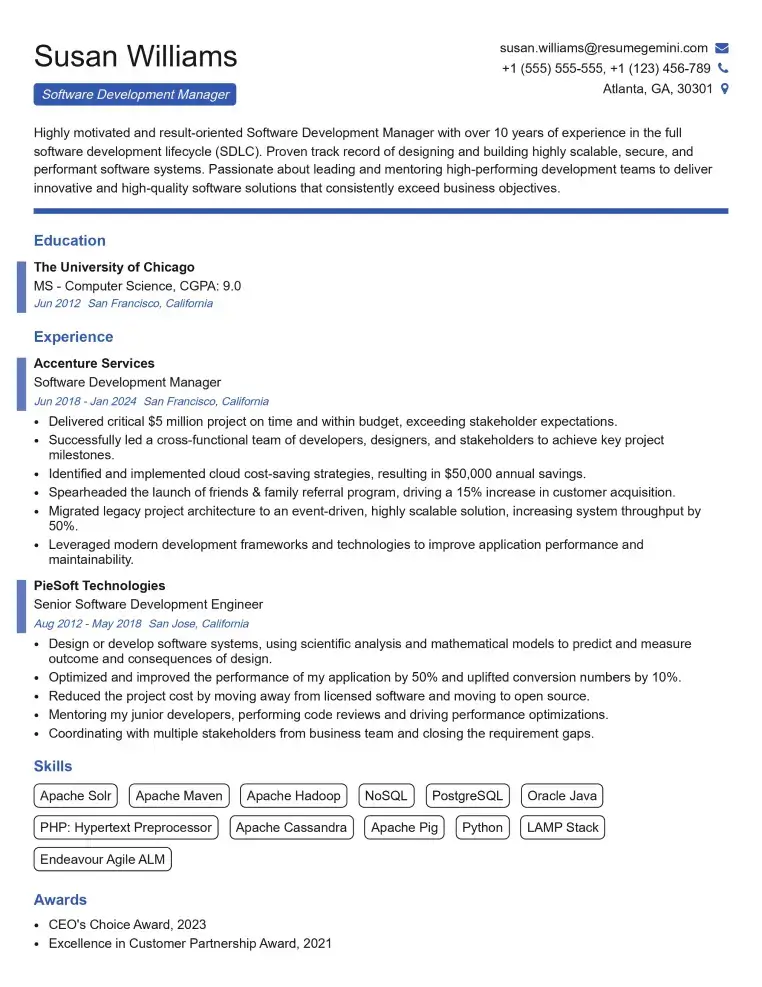
Elevate your job search with our premium resume templates. Here is an amazing resume template that can be used to build a professional and elegant resume. You can build a resume from scratch or revamp your existing resume. Impress hiring managers and secure your next opportunity.
- Top 50 Most Common Interview Questions
- The Psychology of a Great Resume: Hacks to Impress Recruiters
- What Mistakes to Avoid When Writing a Resume: A Comprehensive Guide
- Elevate Your Career with Expert Resume Building: Introducing ResumeGemini
- How to Write a Resume Using Google Gemini: Step-by-Step Guide