





In today’s competitive job market, it’s crucial to have a resume that stands out from the crowd. Applicant Tracking Systems (ATS) are widely used by recruiters to screen resumes, making it essential to optimize your resume for ATS compatibility. ResumeGemini offers a range of ATS-certified resume templates that will help you showcase your skills and experience in a way that maximizes your chances of landing your dream role.
The Importance of ATS Compatibility for Modern Job Searches
ATS are software programs that automate the screening and sorting of job applications. They use algorithms to scan resumes for specific keywords and phrases that match the job description. If your resume does not contain the right keywords, it may be rejected by the ATS, even if you are a qualified candidate.
Using an ATS-friendly resume template will help you ensure that your resume contains the necessary keywords and phrases to pass the ATS screening process. This will give you a significant advantage over other candidates who are using non-ATS-optimized resumes.
Key Features of ATS-Optimized Resume Templates
Here are some of the key features of ATS-optimized resume templates:
- Keyword-rich content: The templates are designed to include common keywords that are used by ATS.
- Clear and concise formatting: The templates use a clean and organized layout that makes it easy for ATS to parse and extract information.
- Standard fonts and font sizes: The templates use standard fonts and font sizes that are compatible with ATS.
- Appropriate file format: The templates are provided in PDF or Word format, which are compatible with most ATS.
Top 10 ATS-Certified Resume Templates for Success
ResumeGemini offers a wide range of ATS-certified resume templates to choose from. Here are our top 10 picks:
- Modern Professional: A clean and modern template that is perfect for any industry.
- Classic Black and White: A timeless template that is both professional and elegant.
- Creative Edge: A visually appealing template that is perfect for creative professionals.
- Executive Summary: A template that features a prominent executive summary to highlight your key skills and experience.
- Functional Resume: A template that is perfect for candidates with non-traditional career paths.
- Chronological Resume: A template that presents your work experience in reverse chronological order.
- Targeted Resume: A template that is specifically tailored to a particular job description.
- Infographic Resume: A visually engaging template that presents your information in a visually appealing way.
- Project-Based Resume: A template that is perfect for candidates who want to highlight their project experience.
- Skill-Based Resume: A template that is perfect for candidates who want to emphasize their skills and abilities.
Customizing Your Template to Highlight Your Unique Skills
Once you have chosen an ATS-certified resume template, you can customize it to highlight your unique skills and experience. Here are some tips:
- Use strong action verbs: When describing your work experience, use strong action verbs that will make your accomplishments stand out.
- Quantify your achievements: Whenever possible, quantify your accomplishments to demonstrate the impact of your work.
- Tailor your resume to each job description: Take the time to tailor your resume to each job description that you apply for. This will show the employer that you are genuinely interested in the position.
- Proofread carefully: Before you submit your resume, proofread it carefully for any errors. A well-proofread resume will make a positive impression on the employer.
Additional Tips for Crafting an ATS-Beating Resume
In addition to using an ATS-certified resume template, here are some additional tips for crafting an ATS-beating resume:
- Use a consistent font and font size throughout your resume.
- Avoid using images or graphics in your resume.
- Do not include personal information such as your address or phone number on your resume.
- Keep your resume length to one page.
- Use keywords throughout your resume, but do not overuse them.
Common Mistakes to Avoid When Using ATS-Friendly Templates
Here are some common mistakes to avoid when using ATS-friendly resume templates:
- Using a template that is not ATS-certified.
- Customizing the template too much so that it is no longer ATS-friendly.
- Using an overly complicated or cluttered template.
- Including too much personal information on your resume.
- Making grammatical errors or typos on your resume.
Career Expert Tips:
- Select the ideal resume template to showcase your professional experience effectively.
- Master the art of resume writing to highlight your unique qualifications and achievements.
- Checkout the resume writing tips for guidance and best practices.
- Make your 2025 brighter with a new job. Build a powerful resume with ResumeGemini and save big, enjoy exclusive discounts on premium templates.
Frequently Asked Questions (FAQ’s)
Why is using an ATS-friendly resume template important?
In today’s job market, Applicant Tracking Systems (ATS) are widely used by recruiters and hiring managers to screen and sort through a large volume of resumes. These systems rely on specific algorithms and keywords to identify qualified candidates. ATS-friendly resume templates are designed to use appropriate formatting and specific keywords that align with these algorithms, increasing the chances that your resume will be recognized and pass through the initial screening process. By using an ATS-friendly template, you can optimize your resume for efficiency and ensure it presents your qualifications in a way that is easily recognizable by ATS.
What features should I look for in an ATS-optimized template?
When selecting an ATS-optimized template, consider the following features:
- Structured Layout and Formatting: Choose a template that is well-organized and follows a standard resume format. This includes using clear headings, subheadings, and bullet points to structure your content. ATS systems rely on a consistent structure to extract information efficiently.
- Keyword Optimization: Look for templates that incorporate relevant industry-specific keywords throughout the resume. ATS systems scan for specific keywords related to the job description, so it is crucial to include these terms in your resume.
- Font and Size: Use professional fonts and font sizes that are easy for ATS systems to read. Avoid using fancy fonts or excessive styling as this can interfere with the scanning process.
- PDF Format: Most ATS systems require resumes to be submitted in PDF format to ensure compatibility. Choose a template that allows you to save your resume as a PDF while maintaining its formatting.
How do I choose the right resume template for my industry and experience?
Consider the following guidelines when selecting a resume template for your specific industry and experience:
- Industry Relevance: Choose a template that is tailored to your industry. Different industries have unique resume norms and expectations. For example, a resume for a creative field may have a more visually appealing design, while a resume for a corporate position may have a more traditional format.
- Experience Level: Entry-level resumes may benefit from templates that provide guidance and structure, while experienced professionals may prefer templates that allow for more customization and tailoring to their specific accomplishments.
- Personal Style: While it’s important to optimize for ATS, don’t forget to choose a template that aligns with your personal style and preferences. This can help you stand out and make a lasting impression.
Can I customize the templates to fit my specific needs?
Yes, ATS-friendly resume templates are designed to be customizable to accommodate your specific needs. While they provide a solid foundation, you should tailor the template to highlight your unique skills, experience, and accomplishments. This may include adjusting the layout, adding additional sections, or modifying the content to match your personal brand.
Are there any drawbacks to using ATS-friendly templates?
While ATS-friendly templates offer many advantages, there are a few potential drawbacks to consider:
- Less Creative Control: ATS-friendly templates are designed to conform to certain standards, which may limit your creative freedom. However, many templates offer a range of customization options to balance standardization with personalization.
- Potential for Overused Templates: Popular ATS-friendly templates may be used by multiple candidates, reducing your resume’s uniqueness. To stand out, focus on customizing the template and highlighting your unique value proposition.
What are the benefits of using ResumeGemini for creating an ATS-optimized resume?
ResumeGemini offers several benefits for creating an ATS-optimized resume:
- ATS-Certified Templates: ResumeGemini’s templates are carefully designed to meet the latest ATS standards and ensure your resume passes through the initial screening process.
- Wide Variety of Options: With over 10 ATS-certified templates, you can choose the one that best suits your industry, experience, and personal style.
- Customization Flexibility: While the templates provide a strong foundation, you can easily customize them to highlight your unique skills and experience.
- Resume Builder Tool: ResumeGemini offers a user-friendly resume builder that guides you through each section, ensuring you provide all the necessary information.
- Preview and Download: You can preview your resume before downloading it, allowing you to make any necessary adjustments and ensure a polished final product.
Next Step:
Unlock your career potential with an ATS-friendly resume that showcases your strengths and lands you your dream job. Visit ResumeGemini today to explore our collection of ATS-certified templates, build your resume, and take the next step towards your professional success.
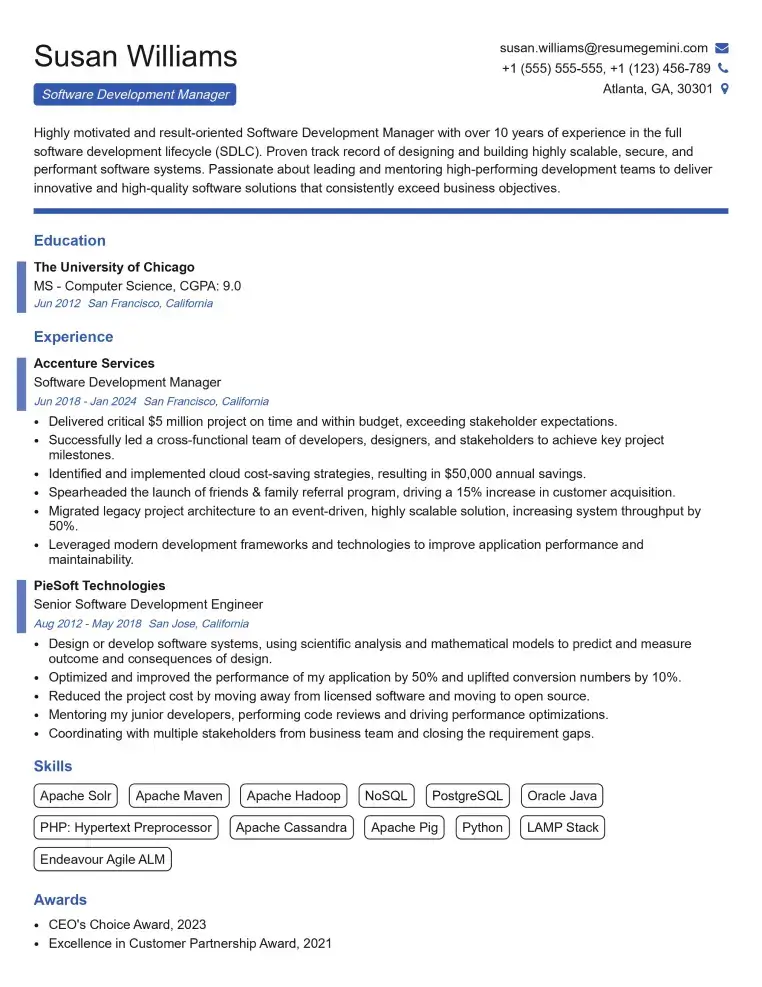
Elevate your job search with our premium resume templates. Here is an amazing resume template that can be used to build a professional and elegant resume. You can build a resume from scratch or revamp your existing resume. Impress hiring managers and secure your next opportunity.
- Top 50 Most Common Interview Questions
- The Psychology of a Great Resume: Hacks to Impress Recruiters
- What Mistakes to Avoid When Writing a Resume: A Comprehensive Guide
- Elevate Your Career with Expert Resume Building: Introducing ResumeGemini
- How to Write a Resume Using Google Gemini: Step-by-Step Guide