





In today’s competitive job market, it’s crucial to make a strong first impression with your resume. A well-crafted resume can showcase your skills, experience, and qualifications, and help you stand out from the competition. If you’re looking to update your resume with ease and boost your job applications, look no further than ResumeGemini‘s 12 ATS-friendly templates.
The Power of ATS-Friendly Resumes
Applicant tracking systems (ATS) are software programs used by recruiters to screen resumes and identify qualified candidates. These systems scan resumes for specific keywords and phrases that match the job description, and they prioritize resumes that contain them. Using an ATS-friendly resume template can help you get your resume past the initial screening process and into the hands of human recruiters.
Benefits of Using ResumeGemini’s Templates
ResumeGemini’s templates are designed to be ATS-friendly and visually appealing. They offer several benefits:
- ATS-friendly: ResumeGemini’s templates are formatted to be easily parsed by ATS, which means your resume has a better chance of being seen by human recruiters.
- Professional and customizable: ResumeGemini’s templates are professional and visually appealing, and they allow for a high degree of customization. You can choose from a variety of fonts, colors, and themes to create a resume that reflects your personal brand.
- Time-saving: Using a template can save you a lot of time and effort. Instead of starting from scratch, you can simply fill in the blanks with your own information. This can be a major advantage if you’re in a hurry.
12 Professional Templates to Showcase Your Skills
ResumeGemini offers 12 professional resume templates to choose from. Each template is designed for a specific industry or job function. Here’s a brief overview of each template:
- Classic: A clean and modern template that is suitable for any industry or job function.
- Modern: A sleek and stylish template that is perfect for creative professionals and job seekers in the tech industry.
- Professional: A professional and polished template that is ideal for job seekers in corporate or administrative roles.
- Executive: A sophisticated and elegant template that is perfect for senior-level executives and professionals.
- Creative: A unique and eye-catching template that is ideal for job seekers in the creative arts and media industries.
- Minimalist: A simple and understated template that is perfect for job seekers who want their resume to stand out without being overwhelming.
- Functional: A skills-based template that is ideal for job seekers who want to highlight their skills and experience rather than their work history.
- Chronological: A traditional template that lists your work history in reverse chronological order. This template is suitable for job seekers with a strong work history.
- Combination: A hybrid template that combines elements of both the functional and chronological templates. This template is ideal for job seekers who want to highlight both their skills and their work history.
- Targeted: A template that is tailored to a specific job or industry. This template is ideal for job seekers who are applying for a specific position.
- Infographic: A visually engaging template that uses charts and graphs to showcase your skills and experience. This template is ideal for job seekers who want to make their resume stand out.
- Academic: A template that is designed specifically for students and recent graduates. This template includes sections for your education, research experience, and publications.
Customizing Templates for an Eye-Catching Resume
Once you’ve chosen a template, you can customize it to create a resume that is unique to you. Here are a few tips for customizing your resume:
- Use strong action verbs: Action verbs are verbs that describe what you have done or accomplished. They are more powerful than passive verbs, and they can help your resume stand out. For example, instead of saying “I worked at a retail store,” you could say “I managed a team of 10 sales associates and increased sales by 15%.”
- Quantify your accomplishments: Whenever possible, quantify your accomplishments to make them more concrete. For example, instead of saying “I led a team of engineers,” you could say “I led a team of 10 engineers and completed a major project 2 months ahead of schedule.”
- Use keywords: When customizing your resume, be sure to include keywords that are relevant to the job you’re applying for. This will help your resume get noticed by ATS and human recruiters.
- Proofread carefully: Before you submit your resume, be sure to proofread it carefully for any errors. Typos and grammatical errors can make your resume look unprofessional.
Preview and Personalize Your Resume with Confidence
Once you’ve customized your resume, you can preview it to see how it will look when it’s printed or exported as a PDF. You can also personalize your resume by adding your own branding, such as your logo and contact information. This will help your resume stand out from the competition.
Additional Sections to Enhance Your Application
In addition to the standard sections, such as your work history and education, you can also add additional sections to your resume to enhance your application. These sections could include:
- Awards and honors: List any awards or honors you have received, both in your professional and personal life.
- Certifications: List any certifications you have earned, such as industry-specific certifications or professional development courses.
- Languages: If you speak multiple languages, be sure to include them on your resume. This can be a valuable asset for many employers.
- Accomplishments: List your most significant accomplishments, both in your professional and personal life. This could include projects you’ve completed, awards you’ve won, or goals you’ve achieved.
- Extracurricular activities: If you’ve been involved in any extracurricular activities, such as volunteering or sports, be sure to include them on your resume. This can show employers that you’re a well-rounded individual with a variety of interests.
- References: You can include a list of references on your resume, but it’s not necessary. If you choose to include references, be sure to ask them for permission first.
By following these tips, you can create a resume that is both eye-catching and professional. Using ResumeGemini’s ATS-friendly templates and customization options, you can update your resume with ease and boost your job applications.
Career Expert Tips:
- Select the ideal resume template to showcase your professional experience effectively.
- Master the art of resume writing to highlight your unique qualifications and achievements.
- Checkout the resume writing tips for guidance and best practices.
- Make your 2025 brighter with a new job. Build a powerful resume with ResumeGemini and save big, enjoy exclusive discounts on premium templates.
Frequently Asked Questions (FAQ’s)
What is an ATS-friendly resume?
An Applicant Tracking System (ATS) is software used by recruiters to screen resumes. An ATS-friendly resume is formatted in a way that makes it easy for the ATS to parse and extract important information, such as your name, contact information, skills, and experience. This can help your resume get past the initial screening process and into the hands of a human recruiter.
How can I use ResumeGemini’s templates?
ResumeGemini’s templates are easy to use. Simply choose a template that you like, and then fill in the blanks with your own information. You can also customize the template to fit your specific needs by adding or removing sections, changing the font, or adding your own colors.
Can I customize the templates to fit my specific needs?
Yes, you can customize ResumeGemini’s templates to fit your specific needs. You can add or remove sections, change the font, or add your own colors. You can also upload your own logo or headshot.
What are the benefits of using multiple templates?
Using multiple templates can help you tailor your resume to different jobs. For example, you might use a more traditional template for a job at a conservative company, and a more creative template for a job at a startup.
How do I choose the right template for my industry?
When choosing a resume template, it is important to consider the industry you are applying for. For example, if you are applying for a job in a creative field, you might choose a template with a more modern design. If you are applying for a job in a more traditional field, you might choose a template with a more classic design.
Can I save my resume as a PDF or other file type?
Yes, you can save your resume as a PDF or other file type. Simply click on the “Export” button and select the file type you want to save your resume as.
Next Step:
Now that you know how to use ResumeGemini’s ATS-friendly templates, it’s time to start building your resume. With ResumeGemini, you can create a professional resume in minutes. So what are you waiting for? Head over to ResumeGemini and get started today.
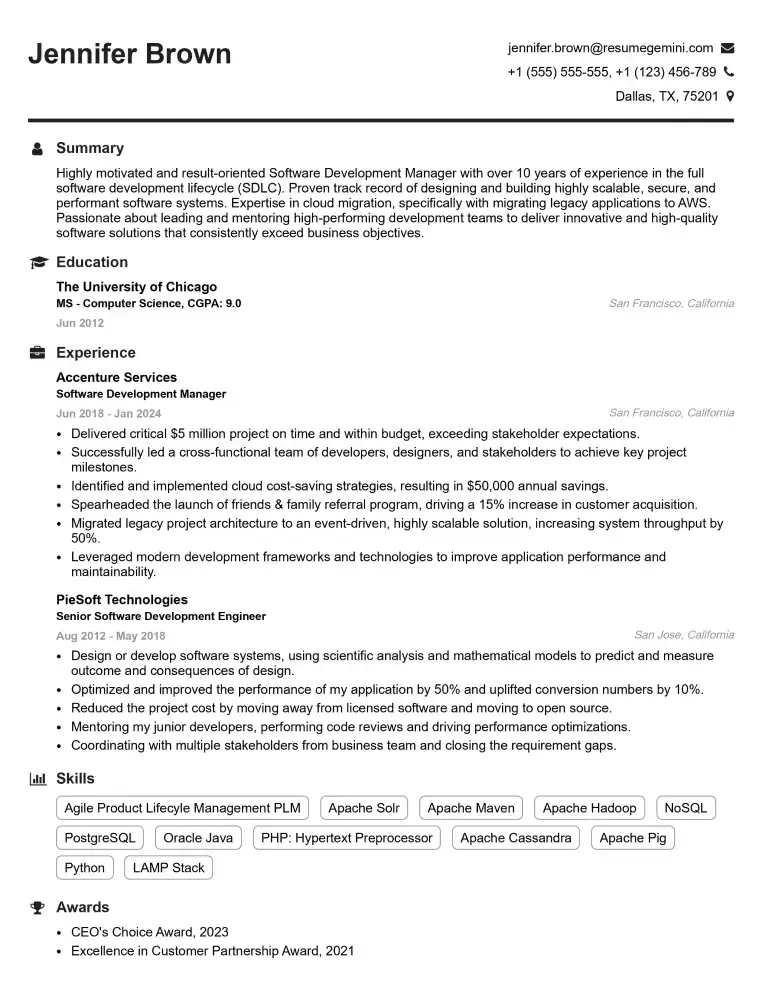
Elevate your job search with our premium resume templates. Here is an amazing resume template that can be used to build a professional and elegant resume. You can build a resume from scratch or revamp your existing resume. Impress hiring managers and secure your next opportunity.
- Top 50 Most Common Interview Questions
- The Psychology of a Great Resume: Hacks to Impress Recruiters
- What Mistakes to Avoid When Writing a Resume: A Comprehensive Guide
- Elevate Your Career with Expert Resume Building: Introducing ResumeGemini
- How to Write a Resume Using Google Gemini: Step-by-Step Guide