





In the competitive job market of today, a well-crafted resume is not just a piece of paper; it’s your chance to stand out from the crowd and land your dream job. A professional resume template can help you create a visually appealing and error-free resume that will impress hiring managers and get you noticed.
11 Professionally Crafted Resume Templates to Choose From
At ResumeGemini, we understand the importance of a great resume. That’s why we offer a wide range of professionally crafted resume templates to choose from. Whether you’re a recent graduate or an experienced professional, we have a template that will suit your needs. Our templates are designed to be ATS-friendly and visually appealing, so you can be sure that your resume will get noticed by hiring managers.
Here’s a sneak peek at some of our most popular resume templates:
- Classic Resume Template: A clean and professional template that’s perfect for any industry.
- Modern Resume Template: A stylish and eye-catching template that will make you stand out from the crowd.
- Creative Resume Template: A unique and creative template that’s perfect for showcasing your personality and skills.
- Infographic Resume Template: A visually appealing template that uses infographics to highlight your skills and experience.
- Functional Resume Template: A skills-based template that’s perfect for highlighting your skills and abilities.
- Chronological Resume Template: A traditional template that lists your work experience in reverse chronological order.
- Combination Resume Template: A hybrid template that combines elements of the chronological and functional resume formats.
- Targeted Resume Template: A resume that is tailored to a specific job or industry.
- Project-Based Resume Template: A resume that highlights your project experience.
- Academic Resume Template: A resume that is designed for academic professionals.
- Executive Resume Template: A resume that is designed for senior-level executives.
How to Pick the Perfect Resume Template for Your Industry
The key to choosing the perfect resume template is to find one that matches your industry and experience level. For example, if you’re a recent graduate, you may want to choose a template that is designed for entry-level job seekers. If you’re an experienced professional, you may want to choose a template that is more tailored to your specific industry.
Here are a few tips for choosing the right resume template:
- Consider your industry: Different industries have different resume conventions. For example, some industries prefer resumes that are more formal, while others prefer resumes that are more creative.
- Consider your experience level: If you’re a recent graduate, you may want to choose a template that is designed for entry-level job seekers. If you’re an experienced professional, you may want to choose a template that is more tailored to your specific industry.
- Consider your personal style: Your resume should reflect your personal brand. Choose a template that matches your personality and style.
Customize Your Template to Showcase Your Unique Skills
Once you’ve chosen a resume template, it’s time to customize it to showcase your unique skills and experience. Here are a few tips for customizing your resume template:
- Use strong action verbs: When describing your experience, use strong action verbs that will make your resume more impactful.
- Highlight your skills: Make sure to highlight your skills and abilities in your resume. Use keywords that hiring managers are looking for.
- Quantify your accomplishments: Whenever possible, quantify your accomplishments to show hiring managers the impact of your work.
- Proofread your resume carefully: Before submitting your resume, proofread it carefully for any errors.
Write a Resume that’s ATS-Friendly and Impresses Recruiters
In addition to being visually appealing and error-free, your resume also needs to be ATS-friendly. ATS, or applicant tracking systems, are used by many companies to screen resumes. If your resume is not ATS-friendly, it may get filtered out and never seen by a human recruiter.
Here are a few tips for writing an ATS-friendly resume:
- Use keywords: Make sure to include relevant keywords in your resume so that it will be picked up by ATS.
- Use a standard font: Avoid using fancy fonts or special characters in your resume. ATS may not be able to read these fonts.
- Use a consistent format: Make sure your resume is consistent in terms of font, font size, and spacing.
- Avoid using graphics: ATS may not be able to read graphics, so it’s best to avoid using them in your resume.
Get Insider Tips on Using Resume Templates Effectively
Now that you know the basics of using resume templates, here are a few insider tips to help you use them effectively:
- Use a template that matches your industry and experience level: The key to choosing the perfect resume template is to find one that matches your industry and experience level.
- Customize your template to showcase your unique skills: Once you’ve chosen a resume template, it’s time to customize it to showcase your unique skills and experience.
- Write a resume that’s ATS-friendly and impresses recruiters: In addition to being visually appealing and error-free, your resume also needs to be ATS-friendly.
- Proofread your resume carefully: Before submitting your resume, proofread it carefully for any errors.
- Get feedback from others: Ask a friend or family member to review your resume and give you feedback.
Download Your Perfect Resume Template Today and Get Hired Faster
Now that you know everything you need to know about resume templates, it’s time to download your perfect template and get started on creating your resume. With ResumeGemini, you can download premium, ATS-friendly, customizable resume templates for a one-time payment with no recurring charges. Our templates are designed to help you create a resume that will impress hiring managers and get you noticed.
So what are you waiting for? Download your perfect resume template today and get started on creating your resume. With ResumeGemini, you can create a resume that will help you land your dream job.
Resume Template Dos and Don’ts
Here are a few resume template dos and don’ts to help you create a resume that will get you noticed:
Dos:
- Do use a template that matches your industry and experience level.
- Do customize your template to showcase your unique skills.
- Do write a resume that’s ATS-friendly and impresses recruiters.
- Do proofread your resume carefully.
- Do get feedback from others.
Don’ts:
- Don’t use a template that is outdated or unprofessional.
- Don’t overcrowd your resume with too much information.
- Don’t use fancy fonts or special characters.
- Don’t use graphics.
- Don’t make any errors.
By following these dos and don’ts, you can create a resume that will help you land your dream job.
Career Expert Tips:
- Select the ideal resume template to showcase your professional experience effectively.
- Master the art of resume writing to highlight your unique qualifications and achievements.
- Checkout the resume writing tips for guidance and best practices.
- Make your 2025 brighter with a new job. Build a powerful resume with ResumeGemini and save big, enjoy exclusive discounts on premium templates.
Frequently Asked Questions (FAQs)
Where can I find high-quality resume templates?
If you’re seeking a comprehensive collection of professionally designed resume templates, ResumeGemini is an excellent choice. With over 12 distinctive templates, each featuring 5 unique color themes, you have a vast selection to choose from. These templates are crafted to cater to various industries and experience levels, ensuring you find the perfect fit for your job applications.
What factors should I consider when choosing a resume template?
Selecting a resume template involves careful consideration of several key factors:
- Industry Relevance: Choose a template that aligns with the norms and expectations of your industry. A template designed for creative professionals may not be suitable for job applications in finance.
- Experience Level: Entry-level candidates may prefer templates that highlight their education and skills, while experienced professionals may opt for templates that emphasize their accomplishments and career progression.
- Personal Style: Consider your personal preferences and choose a template that resonates with your professional image and career goals. Modern and minimalist templates convey a sleek and contemporary look, while traditional templates project a more formal and established demeanor.
How do I customize a resume template to fit my needs?
Customizing a resume template to reflect your unique qualifications is crucial:
- Edit the Content: Replace the placeholder text with your personal information, skills, and experiences. Ensure that the content is tailored to each job application, highlighting the most relevant aspects of your background.
- Adjust the Design: Most resume templates offer customization options, allowing you to modify the font, font size, colors, and layout. Experiment with different combinations to create a visually appealing and professional design.
- Incorporate Visual Elements: Consider adding subtle visual elements, such as icons, graphics, or charts, to enhance the readability and impact of your resume. Use these elements sparingly to maintain a clean and professional look.
What’s the best way to incorporate keywords into my resume using a template?
Incorporating keywords into your resume is essential for optimizing it for applicant tracking systems (ATS) and increasing your chances of being noticed by recruiters:
- Identify Relevant Keywords: Research the job description and industry-specific keywords that are commonly used by employers. These keywords should reflect the skills, experiences, and qualifications that are relevant to the position.
- Use Keywords Naturally: Avoid keyword stuffing, which can hurt your application. Instead, incorporate keywords naturally into your resume content, such as in your skills section, job descriptions, and accomplishments.
- Use Synonyms and Related Terms: Expand your keyword usage by including synonyms and related terms. This demonstrates your proficiency in the area and helps your resume get picked up by ATS.
How can I make my resume stand out using a template?
Making your resume stand out from the competition requires a combination of strategic content and visually appealing design:
- Quantify Your Accomplishments: Use numbers and metrics to demonstrate the impact of your work. For example, instead of saying “Managed a team of 10,” write “Led a team of 10, resulting in a 20% increase in productivity.”
- Use Action Verbs: Start your bullet points with strong action verbs that convey your skills and accomplishments effectively. For example, instead of “Responsible for customer service,” write “Provided exceptional customer service, resolving over 100 inquiries per day.”
- Highlight Your Unique Value: Take the opportunity to showcase what sets you apart from other candidates. Emphasize your unique skills, experiences, and accomplishments that make you the ideal fit for the position.
Can I use resume templates for free?
While there are some websites that offer free resume templates, it’s important to note that these templates may be limited in terms of design options and customization. Additionally, free templates may not be optimized for ATS, which can hinder your chances of getting noticed by recruiters. Professional resume builders like ResumeGemini offer a wide range of premium templates that are designed to meet industry standards and help you create a standout resume.
What are the common mistakes to avoid when using resume templates?
Using resume templates can be beneficial, but it’s important to avoid common pitfalls:
- Overusing Templates: While templates provide a good starting point, avoid relying too heavily on them. Make sure to customize the template to reflect your unique qualifications and career goals.
- Ignoring Keywords: Failing to incorporate relevant keywords into your resume can make it less visible to recruiters and ATS. Research the industry-specific keywords and use them naturally throughout your resume.
- Lack of Proofreading: A resume with errors can create a negative impression. Carefully proofread your resume for any grammatical errors, typos, or formatting issues before submitting it.
Next Step:
Unlock your career potential today! ResumeGemini provides you with the tools and resources you need to create a resume that captivates hiring managers and lands you your dream job. With a vast selection of professionally designed templates, customizable options, and expert guidance, you can craft a resume that stands out from the crowd and makes a lasting impression. Don’t settle for ordinary – elevate your job search with ResumeGemini and take your career to new heights.
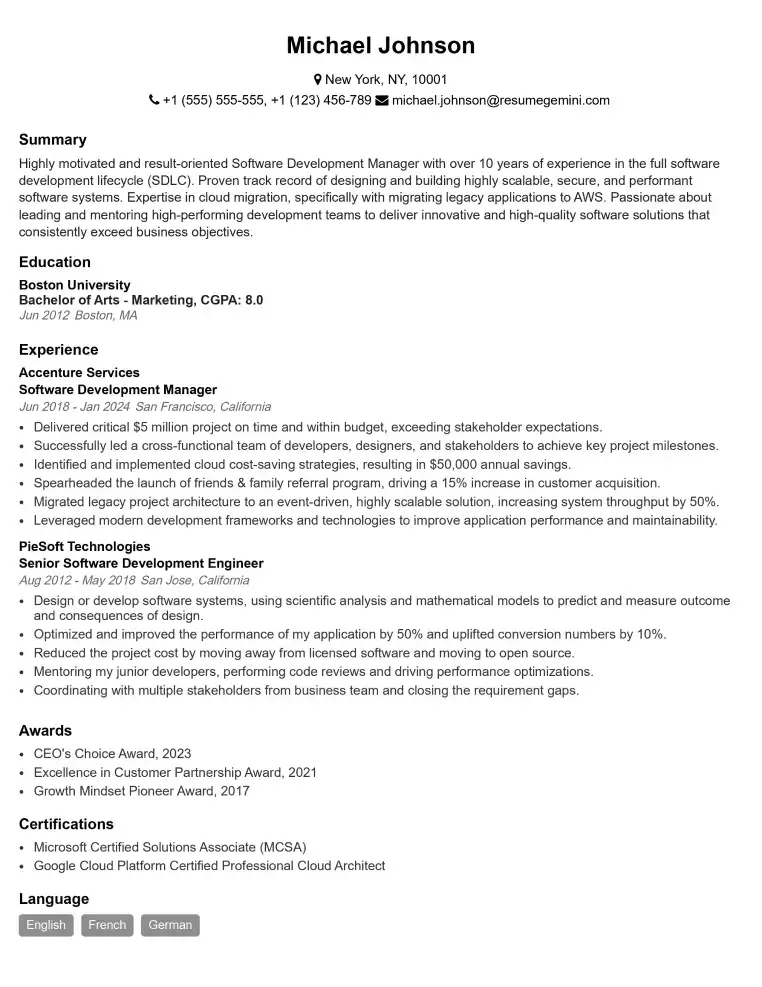
Elevate your job search with our premium resume templates. Here is an amazing resume template that can be used to build a professional and elegant resume. You can build a resume from scratch or revamp your existing resume. Impress hiring managers and secure your next opportunity.
- Top 50 Most Common Interview Questions
- The Psychology of a Great Resume: Hacks to Impress Recruiters
- What Mistakes to Avoid When Writing a Resume: A Comprehensive Guide
- Elevate Your Career with Expert Resume Building: Introducing ResumeGemini
- How to Write a Resume Using Google Gemini: Step-by-Step Guide