





In today’s competitive job market, it’s more important than ever to have a strong resume that will make you stand out from the crowd. That’s where ResumeGemini comes in. We offer a wide range of resume templates that are designed to help you create a professional and polished resume that will get you noticed by hiring managers.
Choosing the Perfect Template for Your Industry and Experience
The first step in creating a great resume is choosing the right template. At ResumeGemini, we offer 12 unique templates, each with its own unique design and features. Whether you’re a recent graduate, a seasoned professional, or anything in between, we have a template that’s perfect for you.
Here are a few things to consider when choosing a template:
- Your industry: Different industries have different expectations for resumes. For example, a resume for a creative professional will likely look different than a resume for a financial analyst.
- Your experience level: If you’re a recent graduate, you may want to choose a template that is designed for entry-level candidates. If you have more experience, you may want to choose a template that is more tailored to your specific field.
- Your personal style: Ultimately, the best template for you is the one that you feel most comfortable with. Choose a template that reflects your personality and brand.
Customizing Your Template to Reflect Your Unique Skills
Once you’ve chosen a template, it’s time to start customizing it to reflect your unique skills and experiences. Here are a few tips:
- Highlight your most relevant skills and experiences. When hiring managers are reviewing resumes, they’re looking for candidates who have the skills and experiences that are most relevant to the job they’re hiring for. Make sure to highlight these skills and experiences in your resume.
- Use strong action verbs. When describing your skills and experiences, use strong action verbs that will make your resume stand out. For example, instead of saying “I managed a team of employees,” say “I led a team of employees to achieve record-breaking sales.”
- Quantify your accomplishments. Whenever possible, quantify your accomplishments to give hiring managers a better sense of your impact. For example, instead of saying “I increased sales,” say “I increased sales by 15%.”
Formatting Your Resume for Maximum Impact
The way you format your resume can have a big impact on its overall appearance and readability. Here are a few tips:
- Use a consistent font and font size throughout your resume. This will give your resume a clean and polished look.
- Use white space to your advantage. Don’t cram too much information onto your resume. Use white space to break up your text and make it easier to read.
- Use headings and subheadings to organize your information. This will make your resume easier to skim and find the information that hiring managers are looking for.
Adding Visual Elements to Enhance Your Resume
Visual elements can help your resume stand out from the crowd. Here are a few ways to add visual elements to your resume:
- Use color. A splash of color can help your resume stand out from the pile. However, don’t go overboard with color. Use it sparingly to highlight important information or to create a visual hierarchy.
- Use images. Images can be a great way to add personality to your resume. For example, you could include a headshot of yourself, or you could use images to illustrate your skills and experiences.
- Use graphs and charts. Graphs and charts can be a great way to visualize your data and make your resume more engaging.
Proofreading and Editing Your Resume for Perfection
Once you’ve finished writing your resume, it’s important to proofread and edit it carefully. This will help you catch any errors in grammar, spelling, or punctuation. It’s also a good idea to have someone else review your resume to get a fresh perspective.
Here are a few tips for proofreading and editing your resume:
- Read your resume aloud. This will help you catch any errors that you might miss when you’re just reading it silently.
- Use a spell checker. A spell checker can help you catch any spelling errors.
- Have someone else review your resume. A fresh pair of eyes can help you catch any errors that you might miss.
With a little effort, you can create a resume that will make you stand out from the crowd and land the job you want. So what are you waiting for? Start building your resume today with ResumeGemini.
Here are some additional tips for writing a great resume:
- Tailor your resume to each job you apply for. Make sure to highlight the skills and experiences that are most relevant to the job you’re applying for.
- Use keywords throughout your resume. Keywords are the words and phrases that hiring managers are looking for when they’re reviewing resumes. Make sure to include relevant keywords throughout your resume.
- Keep your resume concise and to the point. Hiring managers don’t have time to read long, rambling resumes. Keep your resume to one page, and make sure to use concise language.
- Proofread your resume carefully before you submit it. Make sure that there are no errors in grammar, spelling, or punctuation.
Following these tips will help you create a resume that will make you stand out from the crowd and land the job you want.
Career Expert Tips:
- Select the ideal resume template to showcase your professional experience effectively.
- Master the art of resume writing to highlight your unique qualifications and achievements.
- Checkout the resume writing tips for guidance and best practices.
- Make your 2025 brighter with a new job. Build a powerful resume with ResumeGemini and save big, enjoy exclusive discounts on premium templates.
Frequently Asked Questions (FAQ’s)
How do I choose the right resume template for my specific situation?
Choosing the perfect resume template depends on several factors:
- Industry and Profession: Consider the industry norms and expectations for your field.
- Experience Level: Fresh graduates or entry-level candidates may prefer templates with a more modern and creative design, while experienced professionals may opt for a classic and sophisticated look.
- Job Title and Responsibilities: Highlight your relevant skills and qualifications by selecting a template that showcases your strengths for the specific role you’re applying for.
- Personal Style and Brand: Choose a template that aligns with your professional identity and personal brand, making your resume memorable and reflective of your unique personality.
Can I customize the templates to fit my personal brand?
Absolutely! ResumeGemini allows you to fully customize your chosen template to match your personal brand:
- Fonts and Typography: Choose from a range of professional fonts and sizes to create a visually appealing and readable resume.
- Color Themes: Explore various color themes to add a touch of personality and style to your resume, ensuring it stands out from the crowd.
- Sections and Content: Add or remove sections as needed to highlight your relevant skills and experience. Tailor the content to showcase your unique strengths and accomplishments.
- Images and Graphics: Insert images or logos to enhance your resume’s visual appeal and make it more memorable.
What are the best practices for formatting a professional resume?
Formatting is crucial for creating a polished and professional resume:
- Font and Size: Use a professional font in size 10-12 points to ensure readability and visual appeal.
- Margins and White Space: Maintain consistent margins and ample white space to create a visually balanced resume that’s easy on the eyes.
- Section Headings and Bullet Points: Use clear headings and bullet points to structure your resume, making it easy for recruiters to skim and find relevant information.
- Alignment and Consistency: Keep text and elements aligned and maintain consistency throughout your resume to enhance its overall appearance.
- File Format: Save your resume in a universally accepted file format, such as PDF, to ensure it opens correctly on different devices and platforms.
How can I make my resume visually appealing without being distracting?
Visual appeal is key, but it should not compromise professionalism:
- Color and Contrast: Use color sparingly and strategically to highlight important sections or elements without overwhelming the reader. Ensure sufficient contrast for easy readability.
- Graphics and Images: Incorporate relevant images or graphics to support your content, but avoid excessive or distracting visuals.
- Whitespace and Balance: Utilize whitespace effectively to create a balanced and visually appealing resume that’s not cluttered or overwhelming.
- Layout and Design: Experiment with different layouts and designs to create a visually engaging resume while maintaining a clean and professional look.
What are the common errors to watch out for when proofreading my resume?
Proofreading is essential for a polished resume:
- Typos and Spelling: Carefully check for any typos or spelling errors that can undermine your credibility.
- Grammar and Punctuation: Ensure proper grammar, punctuation, and syntax to maintain a professional and polished tone.
- Consistency and Accuracy: Verify that all information, including dates, names, and titles, is consistent and accurate throughout your resume.
- Formatting and Layout: Check for any inconsistencies in formatting or layout to ensure a cohesive and visually appealing resume.
- Objectivity and Language: Use objective and professional language to convey your skills and experience, avoiding subjective or exaggerated claims.
How can ResumeGemini help me create a resume that stands out?
ResumeGemini offers a range of features and benefits to help you create a standout resume:
- Pre-built Resume Samples: Explore a vast collection of 45,000+ pre-built resume samples tailored to various job titles and industries.
- ATS-friendly Templates: Utilize ATS-friendly resume templates that are optimized to pass through Applicant Tracking Systems (ATS) and reach recruiters.
- Content Examples and Guidance: Access a comprehensive library of content examples and expert guidance to help you craft a compelling resume that showcases your strengths.
- Step-by-Step Builder: Follow a structured step-by-step process to create a well-organized and effective resume.
- Customizable Templates: Choose from 12 unique resume templates, each with 5 color themes, giving you 60 unique options to match your personal style.
Next Step:
Unlock your potential and elevate your job search with ResumeGemini. Our exclusive collection of 12 resume templates, each with 5 color themes, provides you with 60 unique options to create a resume that will make you stand out from the competition. Take advantage of our pre-built resume samples, ATS-friendly templates, and expert guidance to craft a resume that will leave a lasting impression on potential employers. With ResumeGemini, you’ll gain an unfair advantage in your job search and take the first step towards landing your dream career.
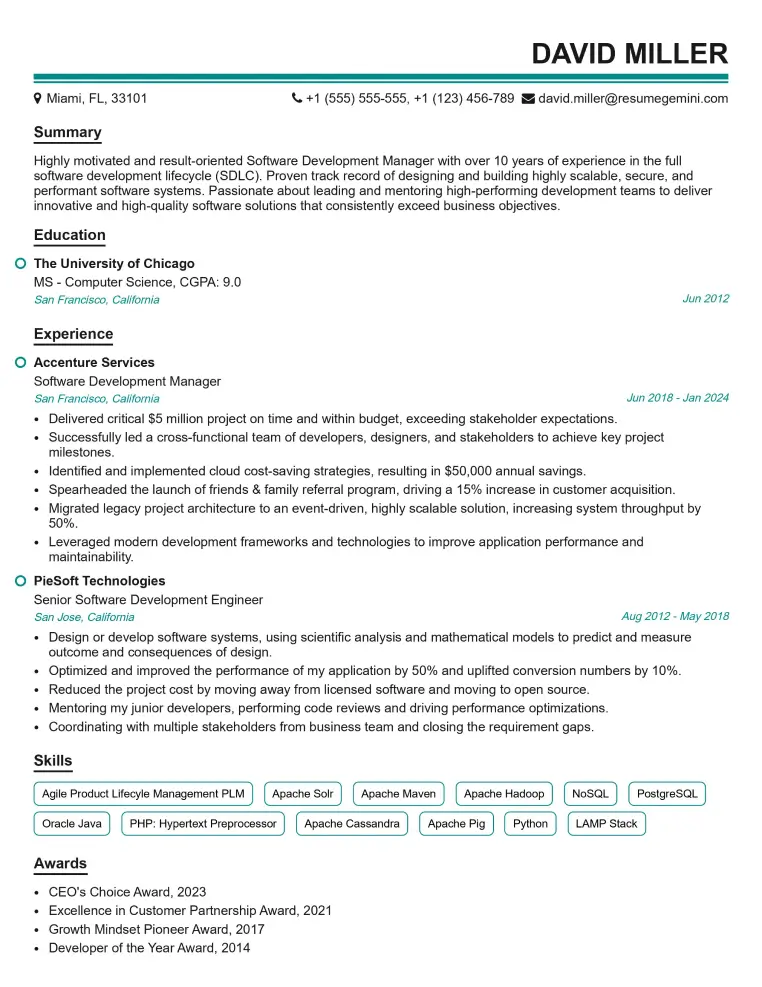
Elevate your job search with our premium resume templates. Here is an amazing resume template that can be used to build a professional and elegant resume. You can build a resume from scratch or revamp your existing resume. Impress hiring managers and secure your next opportunity.
- Top 50 Most Common Interview Questions
- The Psychology of a Great Resume: Hacks to Impress Recruiters
- What Mistakes to Avoid When Writing a Resume: A Comprehensive Guide
- Elevate Your Career with Expert Resume Building: Introducing ResumeGemini
- How to Write a Resume Using Google Gemini: Step-by-Step Guide