





In today’s competitive job market, a well-crafted resume is not just an option – it’s a necessity. And in the digital age, where most resumes are initially screened by an Applicant Tracking System (ATS), creating an ATS-friendly resume is more important than ever. An ATS-optimized resume can significantly increase your chances of getting noticed by potential employers, getting past the dreaded black hole of job applications, and landing that coveted interview. This comprehensive guide will delve into the intricacies of ATS-friendly resumes, providing you with the knowledge and strategies to create a resume that will stand out from the crowd and help you secure your dream job.
What is an ATS and Why Does it Matter?
An Applicant Tracking System (ATS) is a software program used by recruiters and hiring managers to manage the recruitment process, from initial screening to scheduling interviews. ATSs use algorithms to scan resumes, extracting keywords and matching them to job requirements. Resumes that don’t meet certain criteria, such as including relevant keywords, may be automatically rejected, never reaching the human eye. Therefore, it is crucial to tailor your resume to the specific requirements of the ATS.
Optimizing Your Resume for ATS Scans
Optimizing your resume for ATS scans involves several key strategies:
- Use Keywords Wisely: ATSs rely on keywords to identify relevant resumes. Research common keywords related to your industry and job title, and incorporate them naturally throughout your resume, particularly in your skills section and job descriptions.
- Structure Your Resume Clearly: ATSs prefer resumes with a clear and consistent structure. Use standard headings, such as “Experience,” “Skills,” and “Education,” and avoid using fancy fonts or graphics that can confuse the system.
- Use a Professional Template: Professional resume templates are designed to be ATS-friendly, ensuring that your resume is formatted in a way that can be easily scanned and processed by the system.
- Convert Your Resume to PDF: PDFs are the preferred file format for resumes, as they maintain the original formatting and prevent ATSs from encountering errors.
- Proofread Carefully: Before submitting your resume, proofread it carefully for any errors, including typos and formatting issues. Errors can prevent the ATS from accurately scanning and evaluating your resume.
Using Keywords to Your Advantage
Keywords are the key to unlocking the ATS’s favor. When optimizing your resume for keywords, keep the following tips in mind:
- Identify Relevant Keywords: Research the job description and industry-specific keywords using tools like Google Keyword Planner or LinkedIn’s Skill Search. Focus on skills, qualifications, and experience that are directly relevant to the position you’re applying for.
- Incorporate Keywords Naturally: Avoid keyword stuffing, which can hurt your chances. Instead, weave keywords seamlessly into your resume content, ensuring they flow naturally with the rest of the text.
- Use Keywords Prominently: Place keywords in prominent sections of your resume, such as the summary, skills section, and job descriptions. ATSs will give more weight to keywords that appear early in the document.
- Use Synonyms and Variations: Don’t limit yourself to exact keyword matches. ATSs can recognize synonyms and variations, so expand your keyword usage to include related terms.
Structuring Your Resume for Success
A well-structured resume is essential for ATS optimization. Follow these guidelines to create a resume that is both ATS-friendly and visually appealing:
- Use Standard Headings: Use clear and concise headings to separate different sections of your resume, such as “Objective,” “Education,” “Experience,” and “Skills.”
- Quantify Your Achievements: Use numbers and metrics to quantify your accomplishments and demonstrate the impact of your work. This makes your resume more credible and ATS-friendly.
- Use Bullet Points: Bullet points are easier for ATSs to scan than paragraphs. Use concise bullet points to highlight your skills, experience, and achievements.
- Highlight Relevant Experience: Focus on including experience that is directly relevant to the job you’re applying for. Prioritize recent experience and tailor your resume to each specific job application.
- Keep it Concise: ATSs prefer resumes that are one to two pages long. Stick to the essentials and avoid unnecessary details or fluff.
Remember, creating an ATS-friendly resume is an ongoing process of optimization. Regularly review your resume, update your skills and experience, and tailor it to each job application. With a well-crafted ATS-friendly resume, you’ll increase your visibility to potential employers, stand out from the competition, and land your dream job.
Empowering Job Seekers with ResumeGemini
At ResumeGemini, we understand the importance of creating ATS-compliant resumes. Our platform offers a suite of tools to help you craft a resume that will get you noticed:
- ATS-Friendly Templates: Choose from a variety of professional resume templates designed to maximize ATS compatibility.
- Keyword Optimization: Our resume builder suggests relevant keywords based on your industry and job title, helping you optimize your content.
- Resume Analysis: Get instant feedback on your resume, identifying areas for improvement and ensuring ATS compatibility.
- One-Time Payment: Enjoy the benefits of our services without recurring charges.
Don’t let an ATS stand between you and your dream job. Partner with ResumeGemini and create an ATS-friendly resume that will get you noticed and land you the interviews you deserve.
Additional Tips for Resume Success
- Proofread Carefully: Typos and grammatical errors can hurt your chances of getting noticed. Proofread your resume thoroughly before submitting it.
- Tailor Your Resume: Take the time to tailor your resume to each job application, highlighting the skills and experience that are most relevant to the position.
- Get Feedback: Ask a friend, family member, or career counselor to review your resume and provide feedback. Fresh eyes can spot errors or suggest improvements.
- Network and Follow Up: Don’t just submit your resume and wait for the phone to ring. Network with people in your industry, attend job fairs, and follow up with potential employers to increase your chances of landing an interview.
Crafting an ATS-friendly resume is a crucial step in the job search process. By following the strategies outlined in this guide, you can create a resume that will stand out from the crowd and help you land your dream job. Remember, the key to resume success lies in optimization, tailoring, and perseverance.
Career Expert Tips:
- Select the ideal resume template to showcase your professional experience effectively.
- Master the art of resume writing to highlight your unique qualifications and achievements.
- Checkout the resume writing tips for guidance and best practices.
- Make your 2025 brighter with a new job. Build a powerful resume with ResumeGemini and save big, enjoy exclusive discounts on premium templates.
Frequently Asked Questions (FAQ’s)
What is an Applicant Tracking System (ATS)?
An Applicant Tracking System (ATS) is a software program that helps employers manage the hiring process. ATSs can be used to automate tasks such as screening resumes, scheduling interviews, and onboarding new hires. In the USA, UK, and Canada, many companies use ATS to streamline their hiring process, making it more efficient and effective.
How do ATSs work?
ATSs use a variety of algorithms to scan and rank resumes. These algorithms look for specific keywords and phrases that are relevant to the job opening. Resumes that contain these keywords and phrases are more likely to be ranked higher in the ATS’s results.
Why is it important to optimize my resume for ATS?
Optimizing your resume for ATS is important because it can help you get your resume seen by more employers. When you optimize your resume for ATS, you are making it more likely that your resume will be ranked higher in the ATS’s results. This means that your resume is more likely to be seen by recruiters and hiring managers.
What are the common mistakes to avoid when writing an ATS-friendly resume?
There are a number of common mistakes that people make when writing ATS-friendly resumes. Some of the most common mistakes include:
- Using too many buzzwords and clichés.
- Formatting your resume in a way that is not ATS-friendly.
- Not including relevant keywords and phrases.
- Not tailoring your resume to the specific job opening.
How can I test my resume for ATS compatibility?
There are a number of ways to test your resume for ATS compatibility. One way is to use an ATS compatibility scanner. These scanners can be found online and can help you identify any areas of your resume that need improvement.
What are the best practices for formatting an ATS-friendly resume?
There are a number of best practices that you can follow when formatting your resume for ATS. Some of the best practices include:
- Using a simple and easy-to-read font.
- Using a standard resume format.
- Including relevant keywords and phrases.
- Proofreading your resume carefully for any errors.
Next Step:
Now that you know the basics of ATS-friendly resumes, it’s time to start optimizing your own resume. With ResumeGemini, you can easily create an ATS-friendly resume that will help you get noticed by more employers.
ResumeGemini offers a variety of features that can help you optimize your resume for ATS, including:
- ResumeGemini has ATS-friendly templates that have been specifically designed to help your resume get noticed by ATS.
- ResumeGemini provides a resume builder that makes it easy to create a professional-looking resume.
- ResumeGemini offers a resume critique service that can help you identify areas of your resume that need improvement.
With ResumeGemini, you can create an ATS-friendly resume that will help you get noticed by more employers and land your dream job.
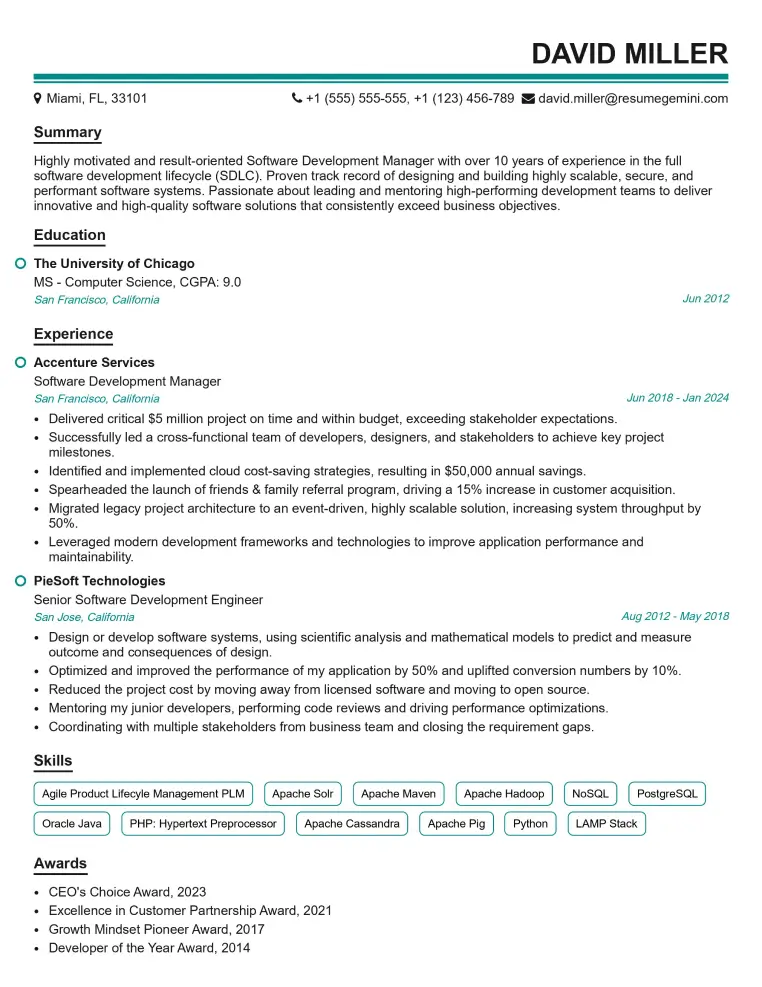
Elevate your job search with our premium resume templates. Here is an amazing resume template that can be used to build a professional and elegant resume. You can build a resume from scratch or revamp your existing resume. Impress hiring managers and secure your next opportunity.
- Top 50 Most Common Interview Questions
- The Psychology of a Great Resume: Hacks to Impress Recruiters
- What Mistakes to Avoid When Writing a Resume: A Comprehensive Guide
- Elevate Your Career with Expert Resume Building: Introducing ResumeGemini
- Crafting Your First Impression: How To Make Free Resume Online For Freshers