





Navigating the competitive job market demands a resume that stands out and meets the evolving standards of hiring processes. Enter the realm of ATS-friendly resumes – a secret weapon that can propel your application to the top of the pile and land you that coveted interview. Let’s delve into the secrets of crafting an ATS-friendly resume that will unlock your career aspirations.
Why Use ATS-friendly Resumes?
An Applicant Tracking System (ATS) is a software tool used by recruiters and hiring managers to screen and filter job applications. ATS scans and analyzes the text content of your resume, identifying keywords and matching them against the specific requirements of the job description. An ATS-friendly resume is optimized to align with these keywords, ensuring your application reaches the right people.
- Increased visibility and recognition by ATS systems
- Improved chances of getting shortlisted for interviews
- Professional and polished presentation, showcasing your skills and experience
How to Create an ATS-friendly Resume
Crafting an ATS-friendly resume requires a strategic approach. Here’s a step-by-step guide to help you create a powerful resume that will make you stand out:
- Use keywords: Identify the most relevant keywords from the job description and incorporate them naturally throughout your resume, especially in your summary, skills section, and work experience descriptions.
- Keep it concise: ATS systems prefer concise resumes, so aim for a length of one page for entry-level positions and up to two pages for experienced professionals.
- Use a clear and consistent font: Opt for professional fonts like Times New Roman, Arial, or Calibri. Maintain consistency in font size and style throughout the resume.
- Organize and structure: Clearly label each section of your resume, ensuring a logical flow of information. Use headings, subheadings, and bullet points to enhance readability.
- Quantify your accomplishments: Use specific numbers and metrics to demonstrate the impact of your contributions in previous roles. This adds credibility and tangibility to your resume.
Common Mistakes to Avoid When Creating ATS-friendly Resumes
While crafting your ATS-friendly resume, avoid these common pitfalls that can hinder your application:
- Using too much jargon or industry-specific terms: Keep your language clear and understandable, avoiding technical terms that ATS systems may not recognize.
- Incorporating images, graphics, or tables: These elements can disrupt the ATS scanning process, so rely on text-based content only.
- Overusing keywords: Keyword stuffing can be detrimental to your resume. Use keywords judiciously and naturally, without compromising the flow or quality of your content.
- Submitting a PDF file: While PDF is a common file format, it can sometimes cause compatibility issues with ATS systems. Use a Word document or plain text format for optimal compatibility.
Additional Tips and Resources for Creating ATS-friendly Resumes
Here are a few extra tips to enhance your ATS-friendly resume:
Create a strong resume summary:
Your resume summary is the first thing recruiters see, so make it impactful. Keep it concise, highlighting your key skills, experience, and career goals.
Use a resume builder:
Online resume builders like ResumeGemini provide templates and tools speziell designed to optimize your resume for ATS systems.
Proofread carefully:
Ensure that your resume is free of grammatical errors, spelling mistakes, or formatting issues. A polished and error-free resume reflects your attention to detail and professionalism.
Get feedback:
Ask a friend, mentor, or career counselor to review your resume and provide feedback. An outside perspective can help you identify areas for improvement.
Creating an ATS-friendly resume is a crucial step in the job application process. By following these guidelines and leveraging the available resources, you can craft a resume that will showcase your skills, demonstrate your value, and increase your chances of securing that dream job.
Career Expert Tips:
- Select the ideal resume template to showcase your professional experience effectively.
- Master the art of resume writing to highlight your unique qualifications and achievements.
- Checkout the resume writing tips for guidance and best practices.
- Make your 2025 brighter with a new job. Build a powerful resume with ResumeGemini and save big, enjoy exclusive discounts on premium templates.
Frequently Asked Questions (FAQ’s)
What is an ATS-friendly resume?
An ATS-friendly resume is a resume that is designed to be easily read and parsed by Applicant Tracking Systems (ATS). ATS are software programs that are used by many companies to screen job applications. By optimizing your resume for ATS, you can increase your chances of getting your application seen by a human recruiter.
- Use a standard font. ATS can have difficulty parsing resumes that use non-standard fonts.
- Use a clear and concise format. ATS are designed to quickly scan resumes, so it is important to use a clear and concise format that is easy to read.
- Use keywords. ATS use keywords to identify relevant candidates. Be sure to include relevant keywords in your resume, especially in your skills section.
- Use a consistent style. ATS can have difficulty parsing resumes that use inconsistent styles. Be sure to use a consistent style throughout your resume, including in your font, font size, and headings.
- Avoid using images and graphics. ATS can have difficulty parsing resumes that contain images and graphics. If you need to include an image or graphic, be sure to use a high-resolution image and save it in a common format, such as JPEG or PNG.
- Proofread your resume carefully. Before you submit your resume, be sure to proofread it carefully for any errors. ATS can be very sensitive to errors, and even a small error can cause your resume to be rejected.
How do I create an ATS-friendly resume?
There are a few key steps you can take to create an ATS-friendly resume:
- Use a resume builder. There are a number of resume builders available online that can help you create an ATS-friendly resume. These builders typically provide a variety of templates and tools that can make it easy to create a resume that is optimized for ATS.
- Use a resume scanner. Once you have created your resume, you can use a resume scanner to check it for errors. Resume scanners can identify errors that can cause your resume to be rejected by ATS.
- Get feedback from a recruiter. If you are not sure whether your resume is ATS-friendly, you can get feedback from a recruiter. Recruiters can help you identify any areas of your resume that need improvement.
What are some common mistakes to avoid when creating an ATS-friendly resume?
There are a few common mistakes that you should avoid when creating an ATS-friendly resume:
- Using too much jargon. ATS can have difficulty parsing resumes that contain too much jargon. Be sure to use clear and concise language that is easy to understand.
- Using too many personal pronouns. ATS can have difficulty parsing resumes that contain too many personal pronouns. Be sure to use a professional tone and avoid using personal pronouns whenever possible.
- Using too many formatting elements. ATS can have difficulty parsing resumes that contain too many formatting elements, such as bold, italics, and underlining. Be sure to use formatting elements sparingly and only when necessary.
- Using too many images and graphics. ATS can have difficulty parsing resumes that contain too many images and graphics. If you need to include an image or graphic, be sure to use a high-resolution image and save it in a common format, such as JPEG or PNG.
- Proofreading your resume carefully. Before you submit your resume, be sure to proofread it carefully for any errors. ATS can be very sensitive to errors, and even a small error can cause your resume to be rejected.
Where can I find additional tips and resources for creating ATS-friendly resumes?
There are a number of resources available online that can help you create an ATS-friendly resume. Here are a few of the most helpful:
- Resume Writing Tips for ATS. This article from The Muse provides a number of helpful tips for writing an ATS-friendly resume.
- The Ultimate Guide to Writing an ATS-Friendly Resume. This guide from CareerBuilder provides a comprehensive overview of everything you need to know about writing an ATS-friendly resume.
- How to Write an ATS-Friendly Resume. This video from Jobscan provides a step-by-step guide to writing an ATS-friendly resume.
What are the benefits of using ResumeGemini?
ResumeGemini is a leading resume builder that can help you create an ATS-friendly resume. Here are a few of the benefits of using ResumeGemini:
- ResumeGemini’s resume templates are designed to be ATS-friendly. This means that your resume will be more likely to be seen by human recruiters.
- ResumeGemini’s resume builder is easy to use. You can create an ATS-friendly resume in just a few minutes.
- ResumeGemini offers a variety of resume templates and tools. This makes it easy to create a resume that is tailored to your specific needs.
- ResumeGemini is affordable. You can create an ATS-friendly resume for a one-time fee of just $29.95.
How can I use ResumeGemini to create an ATS-friendly resume?
To create an ATS-friendly resume using ResumeGemini, follow these steps:
- Go to the ResumeGemini website.
- Click on the “Create a Resume” button.
- Select a resume template.
- Enter your personal information.
- Add your work experience.
- Add your skills.
- Add your education.
- Preview your resume.
- Download your resume.
Next Step:
Now that you know how to create an ATS-friendly resume, it’s time to take the next step and create your own resume using ResumeGemini. With ResumeGemini’s easy-to-use resume builder and ATS-friendly resume templates, you can create a resume that will get you noticed by recruiters and land you the job you want.
Click here to get started with ResumeGemini today!
ResumeGemini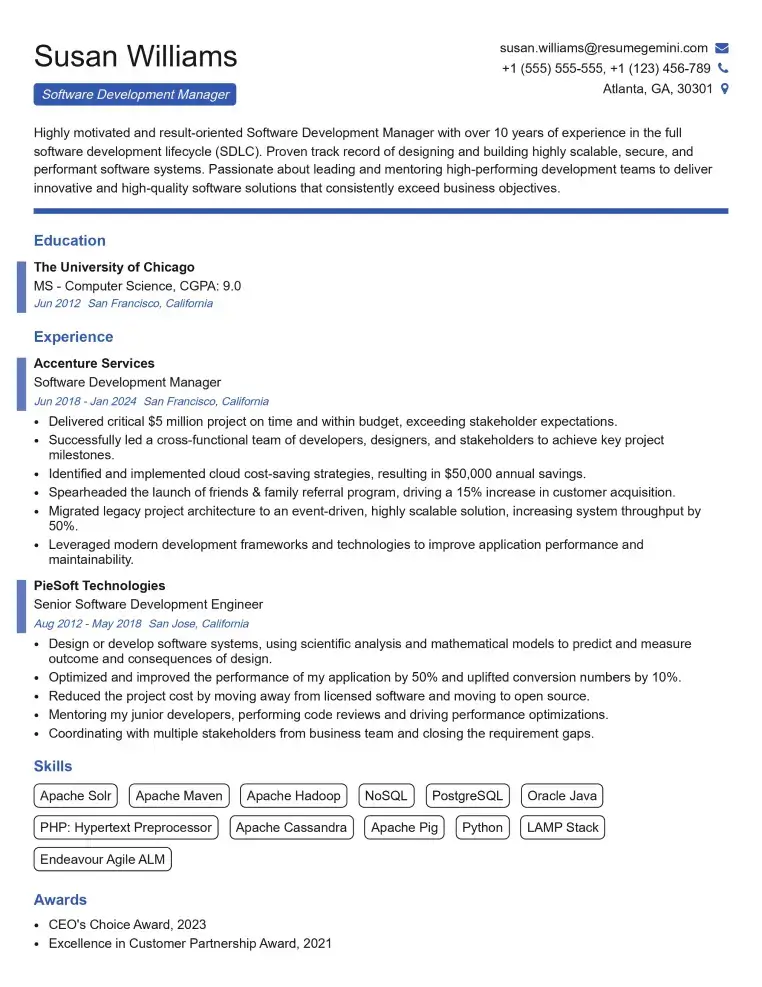
Elevate your job search with our premium resume templates. Here is an amazing resume template that can be used to build a professional and elegant resume. You can build a resume from scratch or revamp your existing resume. Impress hiring managers and secure your next opportunity.
- Top 50 Most Common Interview Questions
- The Psychology of a Great Resume: Hacks to Impress Recruiters
- What Mistakes to Avoid When Writing a Resume: A Comprehensive Guide
- Elevate Your Career with Expert Resume Building: Introducing ResumeGemini
- How to Write a Resume Using Google Gemini: Step-by-Step Guide