





In today’s job market, it’s more important than ever to have an Applicant Tracking System (ATS)-friendly resume. ATSs are software programs that many companies use to screen job applications. If your resume isn’t compatible with the ATS, it may never be seen by a human recruiter.
Understanding ATS
To optimize your resume for the ATS, you must understand how it works. ATSs use algorithms to scan resumes for keywords and phrases relevant to the job description. They then rank the resumes based on the number of matches that are found.
ATSs are not perfect, and there is no guarantee that your resume will be ranked highly even if it contains all of the right keywords. However, by following the tips in this blog post, you can increase your chances of getting your resume seen by a human recruiter.
- By understanding the basics of ATS, you can tailor your resume to increase your chances of getting noticed.
- Ensure your resume is formatted correctly and uses the right keywords for the position you’re applying for.
Crafting an ATS-Friendly Resume
Once you understand how ATSs work, you can start crafting an ATS-friendly resume. Here are a few tips:
- Use keywords: Identify the keywords and phrases that are relevant to the job you’re applying for. Include these keywords in your resume, especially in the job title, summary, and skills section.
- Use the right format: ATSs prefer resumes that are formatted in a simple and easy-to-read way. Use a standard font, such as Times New Roman, Arial, or Calibri. Use a font size of 12 points or larger. Left-align your text, and use single line spacing.
- Avoid using images and graphics: ATSs cannot process images or graphics. If you want to include images or graphics in your resume, save them as PDF files and attach them to your application separately.
Additional tips for optimizing your resume for ATS:
- Use a consistent style throughout your resume.
- Proofread your resume carefully for any errors.
- Get feedback on your resume from a friend, family member, or career counselor.
Showcasing Skills and Experience
In addition to using keywords, you must showcase your skills and experience. The best way to do this is to use action-oriented language. For example, instead of saying, “I managed a team of 10 people,” you could say, “I successfully led a team of 10 people to achieve a 15% increase in sales.”
You should also use numbers and data to quantify your accomplishments. For example, instead of saying, “I improved customer satisfaction,” you could say, “I implemented a new customer service program that resulted in a 20% increase in customer satisfaction.”
Formatting for ATS Readability
Formatting is also important for ATS readability. Here are a few tips:
- Use a clean and simple design: Avoid using too many colors, fonts, or graphics. The simpler your resume is to read, the more likely the ATS will be able to accurately scan it.
- Use headings and subheadings: Headings and subheadings can help break up your resume and make it easier for the ATS to identify the different sections.
- Use white space: White space can help make your resume more readable and less cluttered.
- Use a consistent font and font size: The font and font size you use should be consistent throughout your resume.
- Save your resume as a PDF: PDF is the most widely used file format for resumes. It ensures that your resume will look the same on any computer, regardless of the operating system or software that is being used.
By following these tips, you can create a well-formatted, ATS-friendly resume that will increase your chances of getting noticed by a human recruiter.
Proofreading and Testing
Once you’ve created your resume, it’s important to proofread it carefully for any errors. You should also test your resume with different ATSs to make sure that it’s compatible. There are a number of free online tools that you can use to test your resume, such as ResumeLab and Jobscan.
By following these 5 steps, you can build an ATS-proof resume that will help you stand out in the job market. Good luck with your job search!
Career Expert Tips:
- Select the ideal resume template to showcase your professional experience effectively.
- Master the art of resume writing to highlight your unique qualifications and achievements.
- Checkout the resume writing tips for guidance and best practices.
- Make your 2025 brighter with a new job. Build a powerful resume with ResumeGemini and save big, enjoy exclusive discounts on premium templates.
Frequently Asked Questions (FAQ’s)
1. What are the key differences between an ATS-friendly and a traditional resume?
ATS-friendly resumes stand out from traditional resumes through specific features tailored for automated parsing by Applicant Tracking Systems (ATS). These differences include:
- Structure and Organization: ATS-friendly resumes follow a clean, consistent structure with clear headings and concise text to facilitate easy parsing by ATS algorithms.
- Keyword Optimization: Relevant keywords are strategically incorporated throughout the resume to match those used in job descriptions, increasing visibility to ATS.
- Limited Visual Elements: Visual elements like images, graphics, and elaborate fonts can interfere with ATS scanning, so ATS-friendly resumes typically avoid them.
- File Format: ATS prefer resumes in PDF format, as they maintain formatting and prevent formatting issues that can occur with other file types.
2. How can I identify relevant keywords for my resume?
Identifying relevant keywords involves understanding the specific requirements of each job you apply for. Here are some tips:
- Job Description Analysis: Thoroughly read the job description and identify key responsibilities, skills, and qualifications. These terms are likely to be relevant keywords.
- Industry Research: Conduct research on the industry and specific role you’re targeting to understand the commonly used terms and jargon.
- Online Tools: Utilize online tools like Jobscan and Keyword Sheet to analyze job descriptions and identify potential keywords.
3. What types of formatting are most effective for ATS readability?
ATS-friendly formatting enhances readability for parsing algorithms. Consider these guidelines:
- Font Choice: Use standard fonts like Arial, Helvetica, Times New Roman, Calibri, or Georgia to ensure compatibility with ATS.
- Font Size: Maintain a consistent font size throughout the resume, typically between 10-12 points.
- Headings and Subheadings: Utilize clear headings and subheadings to structure your resume, helping ATS identify important sections.
- White Space and Margins: Incorporate ample white space and margins to improve readability and prevent overcrowding.
- Bullet Points: Use bullet points to list skills, experiences, and accomplishments, as they are easily parsed by ATS.
4. How important is it to proofread and test my resume before submitting it?
Proofreading and testing your resume are crucial for ensuring accuracy, clarity, and ATS compatibility. Here’s why:
- Errors and Consistency: Proofreading helps eliminate any errors in grammar, spelling, and formatting, enhancing overall professionalism.
- ATS Compatibility: Testing your resume using online tools like Resume Lab’s ATS Resume Check allows you to assess its compatibility and make necessary adjustments.
- Human Readability: While optimizing for ATS, ensure your resume is still easy for human recruiters to read and understand.
5. What additional tips can I follow to enhance my resume’s ATS compatibility?
Beyond the core principles, consider these additional tips to further improve ATS compatibility:
- Resume Length: Keep your resume concise, typically around one page for entry-level positions and up to two pages for experienced professionals.
- Quantify Accomplishments: Use numbers and metrics to quantify your accomplishments, demonstrating the impact of your contributions.
- Action Verbs: Start bullet points with strong action verbs that convey your skills and responsibilities.
- Industry-Specific Keywords: Incorporate keywords specific to your industry and target role to increase relevance.
- Avoid Common Mistakes: Be mindful of common ATS pitfalls, such as excessive use of jargon, tables, and graphics.
6. Why choose ResumeGemini to build an ATS-friendly resume?
ResumeGemini offers a suite of features tailored to help you create an ATS-friendly resume:
- ATS-Optimized Templates: Choose from a range of professionally designed templates optimized for ATS compatibility.
- Keyword Suggestion: Get real-time keyword suggestions based on your industry and target job to enhance relevance.
- Proofreading and Testing Tools: Utilize built-in proofreading tools and resume testing features to ensure accuracy and ATS compatibility.
- Customization Options: Customize your resume with various fonts, colors, and layout options while maintaining ATS compatibility.
- One-Time Payment: Enjoy lifetime access to ResumeGemini’s services with a one-time payment, avoiding recurring charges.
Next Step:
Take the next step in your job search journey. Craft a compelling ATS-friendly resume with ResumeGemini today. With its user-friendly interface, customizable templates, and ATS optimization tools, you can create a resume that stands out in the competitive job market. Join the thousands of successful job seekers who have leveraged ResumeGemini to land their dream jobs.
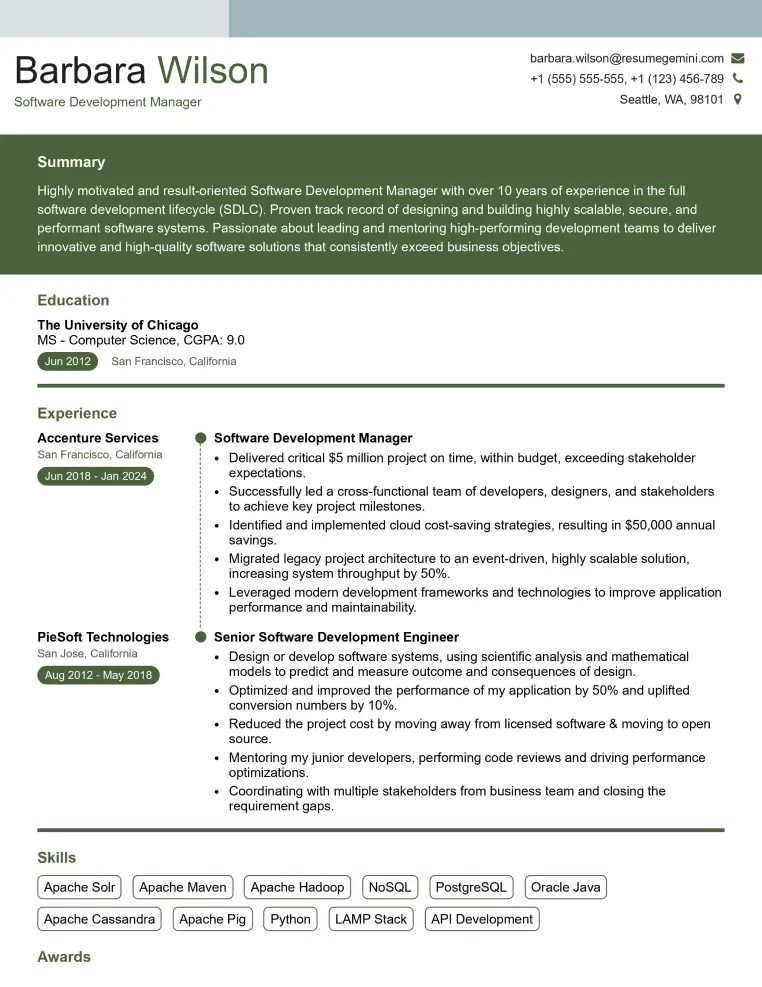
Elevate your job search with our premium resume templates. Here is an amazing resume template that can be used to build a professional and elegant resume. You can build a resume from scratch or revamp your existing resume. Impress hiring managers and secure your next opportunity.
- Top 50 Most Common Interview Questions
- The Psychology of a Great Resume: Hacks to Impress Recruiters
- What Mistakes to Avoid When Writing a Resume: A Comprehensive Guide
- Elevate Your Career with Expert Resume Building: Introducing ResumeGemini
- How to Write a Resume Using Google Gemini: Step-by-Step Guide