





In today’s competitive job market, it’s no longer enough to simply send out a resume. You need to make sure that your resume stands out from the crowd and gets noticed by potential employers. And one of the best ways to do that is to use an ATS-friendly resume template.
Why ATS-friendly Templates are Crucial in Today’s Job Market
Applicant Tracking Systems (ATSs) are software programs that many companies use to screen job applications. These systems scan resumes for specific keywords and phrases that match the job description. If your resume doesn’t contain the right keywords, it’s likely to be rejected by the ATS, and you’ll never even get a chance to be considered for the job.
That’s why it’s so important to use an ATS-friendly resume template. These templates are designed to help your resume get past the ATS and into the hands of a human hiring manager.
Exploring the 3 Most Effective ATS-Compliant Resume Templates
There are many different ATS-friendly resume templates available online. But not all templates are created equal. Here are three of the most effective ATS-compliant resume templates that you can use:
- Chronological Resume Template: This template is the most traditional resume format. It lists your work experience in reverse chronological order, starting with your most recent job. This format is best for candidates with a strong and consistent work history.
- Functional Resume Template: This template focuses on your skills and abilities, rather than your work experience. It’s a good choice for candidates who are changing careers or who have gaps in their work history.
- Combination Resume Template: This template combines elements of both the chronological and functional resume templates. It provides a summary of your skills and experience, followed by a detailed list of your work history. This format is a good choice for candidates with a mix of relevant skills and experience.
Step-by-Step Guide to Choosing the Right Template for Your Industry and Experience
Once you’ve decided on the type of resume template you want to use, you need to choose a template that is specific to your industry and experience. Here are a few things to keep in mind when choosing a template:
- Consider your industry: There are certain resume templates that are more common in certain industries. For example, creative professionals often use portfolios instead of resumes, while IT professionals often use resumes that highlight their technical skills.
- Consider your experience: If you’re a recent graduate, you may want to use a resume template that is designed for entry-level candidates. If you have more experience, you may want to use a template that is more tailored to your specific field.
- Consider your personal style: Ultimately, the best resume template is the one that you feel comfortable with. Choose a template that reflects your personality and that you think will best showcase your skills and experience.
Best Practices for Optimizing Your Resume for ATS (Applicant Tracking Systems)
In addition to using an ATS-friendly resume template, there are a few other things you can do to optimize your resume for ATS:
- Use keywords: Make sure to include relevant keywords in your resume, especially in your job title, summary, and work experience sections.
- Use a consistent format: ATSs have difficulty reading resumes that are not formatted consistently. Use a standard font, font size, and margin size throughout your resume.
- Avoid using images or graphics: ATSs cannot read images or graphics, so avoid using them in your resume.
- Proofread carefully: Before you submit your resume, proofread it carefully for any errors. ATSs are very sensitive to errors, and even a small mistake could cause your resume to be rejected.
By following these tips, you can craft a perfect ATS-friendly resume that will help you get noticed by potential employers and land the job you want.
Career Expert Tips:
- Select the ideal resume template to showcase your professional experience effectively.
- Master the art of resume writing to highlight your unique qualifications and achievements.
- Checkout the resume writing tips for guidance and best practices.
- Make your 2025 brighter with a new job. Build a powerful resume with ResumeGemini and save big, enjoy exclusive discounts on premium templates.
Frequently Asked Questions (FAQ’s)
What is an ATS (Applicant Tracking System) and how does it affect my resume?
An Applicant Tracking System (ATS) is a software program used by many companies to screen and sort job applications. It scans resumes for specific keywords and phrases related to the job description, helping employers identify qualified candidates quickly and efficiently.
To ensure your resume passes through the ATS and reaches the hiring manager’s desk, it’s crucial to optimize it for ATS compatibility. This involves using relevant keywords, maintaining a clear and structured format, and avoiding excessive images or graphics.
By tailoring your resume to meet ATS requirements, you can increase your chances of making a positive first impression and securing an interview.
How can I ensure my resume meets ATS criteria?
To ensure your resume meets ATS criteria, follow these best practices:
- Use relevant keywords: Identify keywords from the job description and incorporate them naturally into your resume content.
- Maintain a clear and consistent format: Use headings, subheadings, and bullet points to organize your information and make it easy for the ATS to parse.
- Avoid excessive images or graphics: Many ATS systems cannot process images or graphics effectively, so it’s best to minimize their use.
- Save your resume in a compatible format: PDF is the most widely accepted format for ATS, so save your resume as a PDF file.
- Proofread carefully: Ensure your resume is free of any errors in grammar, spelling, or formatting.
Are there specific formatting guidelines I need to follow for an ATS-friendly resume?
To make your resume ATS-friendly, follow these formatting guidelines:
- Use a simple and clean font: Avoid using fancy or decorative fonts that may be difficult for the ATS to read.
- Use appropriate font size: The font size should be large enough to be easily readable, typically 11-12 points.
- Maintain consistent margins: Use consistent margins around the edges of your resume to create a polished and professional look.
- Use white space effectively: White space helps break up your resume and make it easier to read. Use white space to separate sections and highlight important information.
Can ATS read resumes saved in PDF format?
Yes, most ATS systems can read resumes saved in PDF format. PDF is a widely accepted format for resumes because it preserves the formatting and layout of the document. However, it’s important to ensure that your PDF resume is text-searchable so that the ATS can extract the information it needs. To make your PDF resume text-searchable, use a PDF editor that supports OCR (Optical Character Recognition) technology.
How many resume templates are available in ResumeGemini?
ResumeGemini offers a wide range of 12 unique resume templates to choose from. Each template comes with 5 distinct color themes, giving you a total of 60 unique template options to suit your individual style and needs.
Are the resume templates customizable to fit my individual style and needs?
Absolutely. ResumeGemini’s resume templates are highly customizable, allowing you to tailor them to your specific needs and preferences. You can easily adjust the font, font size, colors, and layout of each template to create a resume that stands out and reflects your unique personality and career goals.
Next Step:
Craft a professional and ATS-friendly resume using ResumeGemini today. Choose from our extensive library of 12 unique templates, each with 5 color themes, to create a resume that showcases your skills and experience. Our user-friendly interface and expert guidance will help you create a resume that will make a lasting impression and land you your dream job.
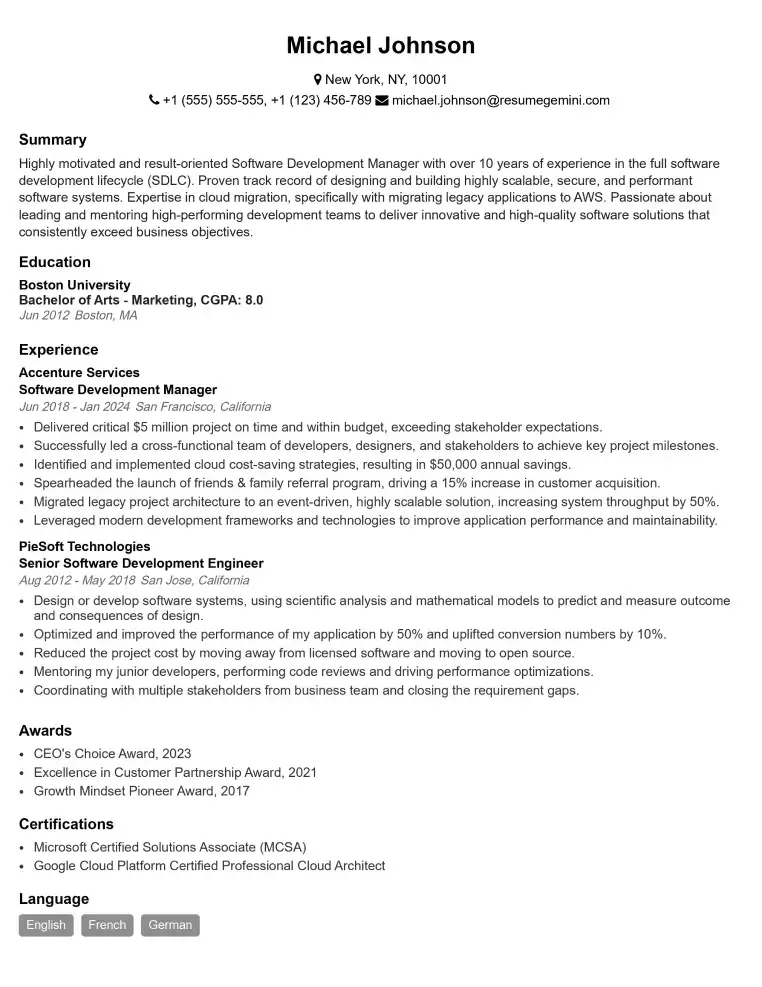
Elevate your job search with our premium resume templates. Here is an amazing resume template that can be used to build a professional and elegant resume. You can build a resume from scratch or revamp your existing resume. Impress hiring managers and secure your next opportunity.
- Top 50 Most Common Interview Questions
- The Psychology of a Great Resume: Hacks to Impress Recruiters
- What Mistakes to Avoid When Writing a Resume: A Comprehensive Guide
- Elevate Your Career with Expert Resume Building: Introducing ResumeGemini
- How to Write a Resume Using Google Gemini: Step-by-Step Guide