





“Your resume is the billboard you post to get the job you want.” – William Arruda
In this digital age, creating an impactful resume is no longer a luxury but a necessity. With the rise of Applicant Tracking Systems (ATS), it’s crucial to optimize your resume with additional sections and design combinations that stand out to recruiters. ResumeGemini empowers you with an array of customization options to showcase your unique skills and achievements. In this comprehensive guide, we’ll delve into six additional sections and 60+ design combinations to help you craft a resume that makes a lasting impression.
Showcase Your Accolades and Achievements with the Awards Section
List any awards, honors, or accolades you’ve received, both professionally and academically. These distinctions demonstrate your exceptional performance and dedication to your field. When listing awards, be sure to include the name of the award, the awarding organization, and the date received. For example:
- Presidential Award for Academic Excellence, XYZ University, May 2023
- Employee of the Month, ABC Corporation, January-March 2022
Highlight Your Expertise with the Certifications Section
Certifications attest to your proficiency in specific skills or knowledge areas. List any relevant certifications you hold, including the certification name, the issuing organization, and the date of certification. For instance:
- Certified Public Accountant (CPA), American Institute of CPAs, October 2022
- Project Management Professional (PMP), Project Management Institute, June 2021
Demonstrate Your Language Proficiency with the Languages Section
If you’re fluent or proficient in multiple languages, showcase your language skills in the Languages section. List each language you speak, read, or write, along with your level of proficiency. For example:
- English: Native
- Spanish: Fluent
- French: Intermediate
Quantify Your Impact with the Accomplishments Section
Go beyond listing your responsibilities and use the Accomplishments section to quantify your contributions. Use specific numbers and data to demonstrate your impact and value to potential employers. For instance:
- Increased sales revenue by 15% through the implementation of a new marketing strategy.
- Managed a team of 10 engineers, resulting in the successful completion of 5 major projects within budget and on time.
Expand Your Profile with the Extra Curricular Section
The Extra Curricular section allows you to highlight your interests, hobbies, and volunteer experiences that aren’t directly related to your professional background. These activities can demonstrate your well-roundedness, leadership abilities, and commitment to community involvement. For example:
- President of the University Debate Club, 2021-2022
- Volunteer tutor at a local community center, 2020-present
Provide Easy Access to References with the References Section
Although not always necessary in a resume, the References section can be useful for providing potential employers with easy access to professional references. List the names, titles, organizations, phone numbers, and email addresses of individuals who can attest to your skills and work ethic. Remember to obtain their consent before including their contact information.
Explore a Range of Template and Color Combinations to Create a Unique Resume Design
ResumeGemini offers a vast selection of resume templates and color themes to complement your content and personal style. With 60+ design combinations available, you can customize your resume to reflect your individuality and industry norms. Here’s how:
| Template Name | Color Theme | Example |
|---|---|---|
| Classic | Blue |  |
| Modern | Green |  |
| Professional | Purple |  |
| Creative | Orange |  |
| Executive | Red |  |
Experiment with different templates and color combinations to find the ones that best showcase your skills and personality. Remember, a visually appealing resume can draw attention and make a positive impression on recruiters.
Remember, tailoring your resume to specific job applications is crucial. Highlight the most relevant skills and experience for each position you apply for. By incorporating these additional sections and exploring the design combinations available on ResumeGemini, you can create a powerful resume that sets you apart from the competition.
Empower Your Resume: Own Your Narrative, Stand Out from the Crowd
Career Expert Tips:
- Select the ideal resume template to showcase your professional experience effectively.
- Master the art of resume writing to highlight your unique qualifications and achievements.
- Checkout the resume writing tips for guidance and best practices.
- Make your 2025 brighter with a new job. Build a powerful resume with ResumeGemini and save big, enjoy exclusive discounts on premium templates.
Frequently Asked Questions (FAQ’s)
What additional sections can I add to my resume?
To make your resume stand out, consider adding sections that highlight your unique skills and experiences. ResumeGemini offers the flexibility to add the following six additional sections:
- Awards: Showcase your recognition and achievements in your field, such as industry awards, academic honors, or scholarships.
- Certifications: List your professional certifications that demonstrate your expertise and commitment to professional development.
- Languages: Highlight your language proficiency, including fluency or working knowledge, in various languages.
- Accomplishments: Quantify your accomplishments and use action verbs to describe your successes in previous roles.
- Extra Curricular: Share your involvement in extracurricular activities that demonstrate your leadership, teamwork, or problem-solving skills.
- References: Provide contact information for professional references who can attest to your skills and work ethic. However, it’s common practice to simply state “References available upon request” instead of listing them directly on your resume.
How do I highlight my awards and accomplishments effectively?
To effectively showcase your awards and accomplishments:
- Quantify your results: Use numbers and metrics to demonstrate the impact of your achievements, whenever possible.
- Start with an action verb: Begin your description of each award or accomplishment with a strong action verb that captures the essence of your contribution.
- Keep it concise: Aim for 2-3 sentences per award or accomplishment to avoid overwhelming the reader.
- Use keywords: Include relevant keywords that potential employers may be searching for, especially if you’re applying online.
Example:
- Award: National Sales Award
- Description: Recognized for consistently exceeding sales targets by 15%, resulting in a significant increase in revenue.
How can I showcase my language skills in a professional manner?
To professionally showcase your language skills:
- Use a standardized language proficiency scale: Indicate your language proficiency level using a recognized scale, such as the Common European Framework of Reference for Languages (CEFR).
- Provide context: Briefly describe how you acquired your language skills, whether through education, immersion, or work experience.
- List relevant languages: Prioritize listing languages that are relevant to your industry or target job position.
Example:
- Language: Spanish
- Proficiency: Native Speaker
- Context: Grew up in a Spanish-speaking household and have lived in Spain for two years.
What is the best way to quantify my achievements on my resume?
To quantify your achievements and make them more impactful:
- Use specific numbers and metrics: Provide concrete data to demonstrate your contributions and results.
- Highlight percentages and rates: Quantify your achievements using percentages, rates, or ratios to show the magnitude of your impact.
- Use action verbs: Start your descriptions with strong action verbs that convey the significance of your accomplishments.
Example:
- Increased sales revenue by 25% over a 6-month period
- Reduced operational costs by 10% through process optimization
How do I choose the right design combination for my resume?
To select the most suitable design combination for your resume:
- Consider your industry and profession: Choose a design that aligns with the norms and expectations of your industry and target job position.
- Highlight your skills and experience: Select a design that effectively showcases your key skills and experience, making it easy for recruiters to identify your strengths.
- Maintain a professional and modern look: Opt for a clean and modern design that presents your information in a visually appealing and professional manner.
ResumeGemini provides 60+ unique design combinations to cater to diverse preferences and industries. With 12 distinct templates, each offering 5 color themes, you have ample options to create a resume that stands out.
How do I use ResumeGemini to create a professional resume?
Using ResumeGemini to create a professional resume is simple and efficient:
- Select a template: Choose from a range of professionally designed templates that suit your industry and career level.
- Customize your content: Add your personal information, skills, experience, and any additional sections as needed.
- Choose a design: Explore various design combinations to find the one that best complements your resume and highlights your strengths.
- Preview and download: Preview your resume to ensure it meets your expectations and download it in PDF format, ready to share with potential employers.
Next Step:
Empower your resume with ResumeGemini’s comprehensive resume builder. Add the essential additional sections to showcase your awards, certifications, languages, accomplishments, and more. Explore the 60+ design combinations to create a resume that stands out.
Visit ResumeGemini to get started today and create a resume that effectively communicates your unique skills and experience.
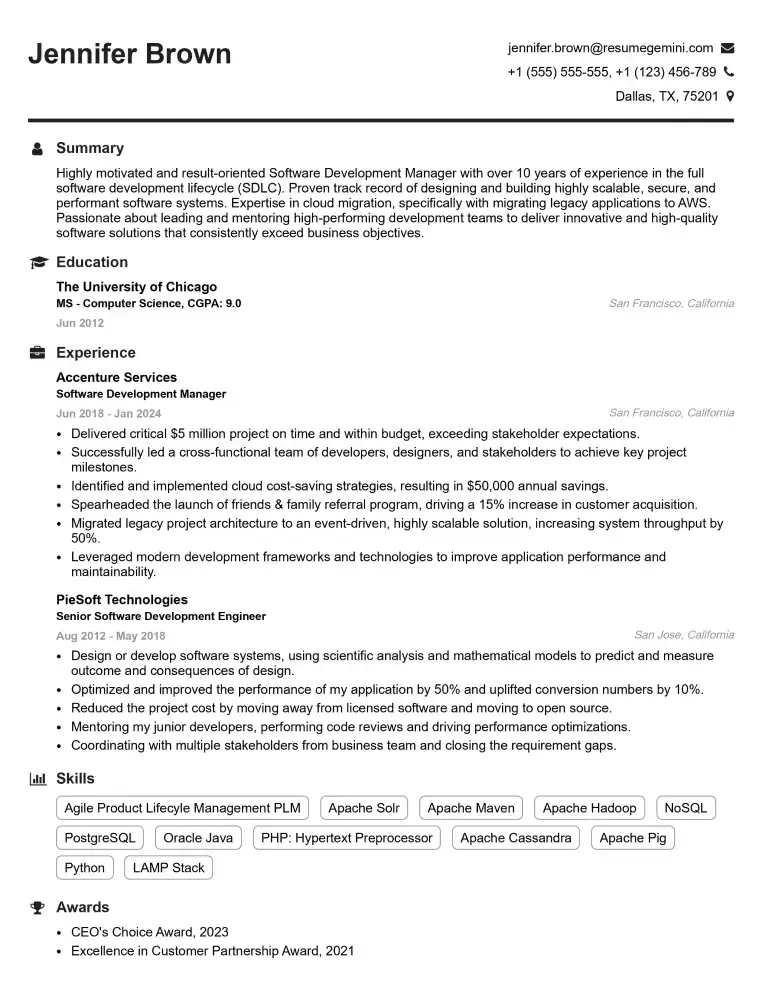
Elevate your job search with our premium resume templates. Here is an amazing resume template that can be used to build a professional and elegant resume. You can build a resume from scratch or revamp your existing resume. Impress hiring managers and secure your next opportunity.
- Top 50 Most Common Interview Questions
- The Psychology of a Great Resume: Hacks to Impress Recruiters
- What Mistakes to Avoid When Writing a Resume: A Comprehensive Guide
- Elevate Your Career with Expert Resume Building: Introducing ResumeGemini
- How to Write a Resume Using Google Gemini: Step-by-Step Guide